
Mobile app · Account and subscription
Stock Master plans: Essentials, Plus and Premium compared
What the free version of Stock Master includes, what the Essentials, Plus and Premium plans add, how to subscribe, restore a purchase and cancel.
On this page
Stock Master is free to download and use, with ads and a few limits. Three subscription plans — Essentials, Plus and Premium — remove the ads and the limits, and the higher two add real-time exchange data and larger AI allowances. This guide sets out what the free version includes, what each plan adds, and how to subscribe, restore a purchase and cancel.
Prices below are the US App Store prices shown in the app in October 2026. The app always shows the current price in your own currency before you pay.
The plans screen
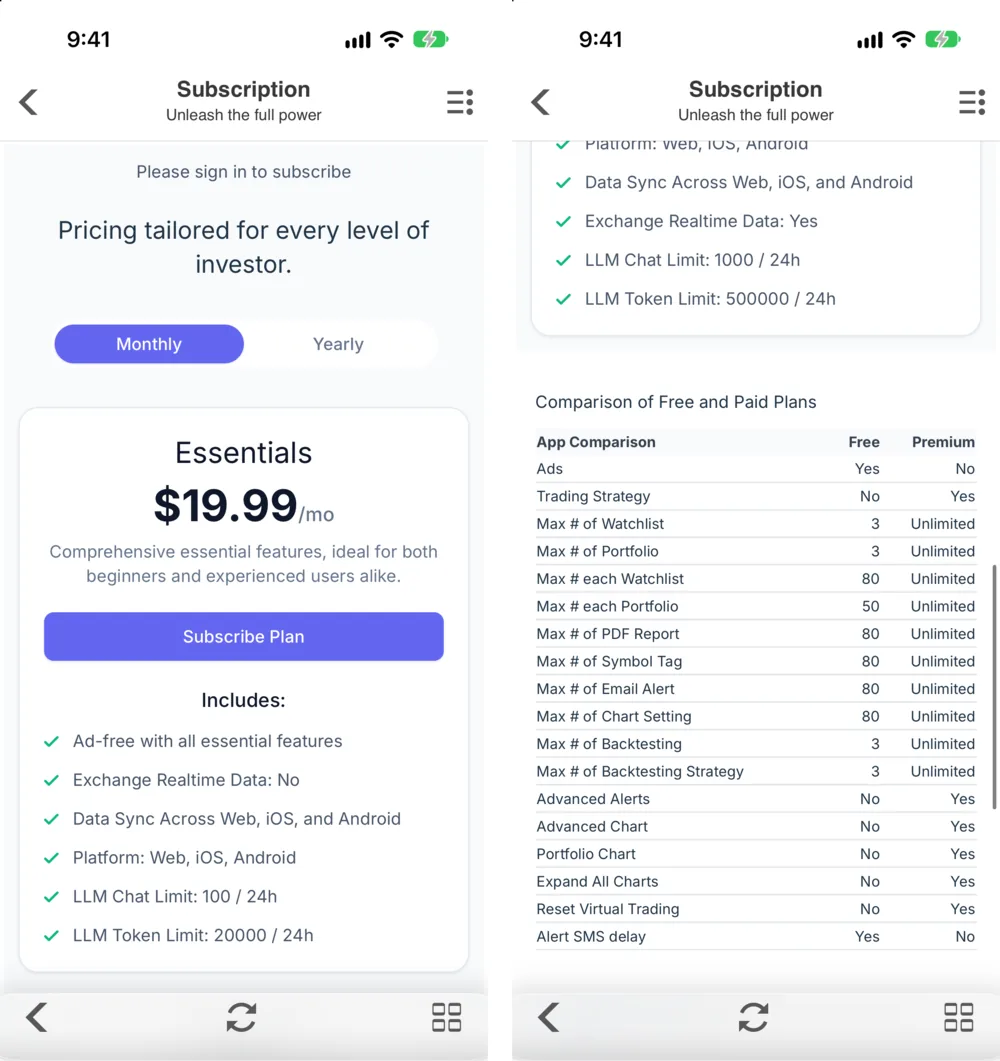
Open Settings › InApp Purchases › Subscription, or tap Go Unlimited in the side menu. The Subscription screen ("Unleash the full power") has a Monthly / Yearly switch, a card for each plan with a Subscribe Plan button, and below them the comparison table, the renewal terms and links to the Privacy Policy and Terms of Use. If you aren't signed in, the top of the screen reminds you to sign in to subscribe (Sign in, sync across devices and back up Stock Master).
The three plans
| Plan | Monthly (US, Oct 2026) | Ads | Exchange Realtime Data | AI chat requests / 24 h | AI tokens / 24 h |
|---|---|---|---|---|---|
| Essentials | $19.99 | Ad-free | No | 100 | 20,000 |
| Plus | $24.99 | Ad-free | Yes | 500 | 100,000 |
| Premium | $29.99 | Ad-free | Yes | 1,000 | 500,000 |
All three include all essential features, Data Sync Across Web, iOS, and Android, and work on the web, iOS and Android. The Yearly switch shows the annual prices.
Exchange Realtime Data is what most traders pay for: quotes from the real-time exchange feed instead of the standard feed (Real-time and extended-hours prices in Stock Master). If you only want ad-free use and no limits, Essentials is enough.
Free versus paid
The comparison table on the plans screen lists the limits a plan removes:
| Feature | Free | Paid |
|---|---|---|
| Ads | Yes | No |
| Trading Strategy | No | Yes |
| Max # of Watchlist | 3 | Unlimited |
| Max # of Portfolio | 3 | Unlimited |
| Max # each Watchlist | 80 | Unlimited |
| Max # each Portfolio | 50 | Unlimited |
| Max # of Backtesting | 3 | Unlimited |
| Max # of Backtesting Strategy | 3 | Unlimited |
| Advanced Alerts | No | Yes |
| Advanced Chart | No | Yes |
| Portfolio Chart | No | Yes |
| Reset Virtual Trading | No | Yes |
The table also lists caps of 80 for PDF reports, symbol tags, email alerts and chart settings on the free version. Advanced Chart means the intraday chart intervals (1-minute to weekly bars) in Interactive charts in Stock Master: ranges, types and zoom.
Subscribe, change or cancel
- Sign in.
- Open the plans screen, choose Monthly or Yearly, and tap Subscribe Plan on the plan you want. Payment goes through your Apple ID like any App Store purchase.
- To move to another plan, tap Change Plan on it; your current plan shows Current Plan.
Subscriptions renew automatically unless you turn off auto-renew at least 24 hours before the end of the period. To cancel, open the iPhone's Settings › [your name] › Subscriptions, or manage it from the App Store. Deleting the app or your account doesn't cancel a subscription.
A subscription is attached to the Finabase account you were signed in with when you bought it.
Restore a purchase
If you reinstalled the app or moved to a new iPhone, sign in with the same account and the plan follows you. For purchases made the old way — including the discontinued All In One upgrade — tap Restore in the note at the bottom of the plans screen. The restore screen checks your Apple ID's purchases ("Restore if you have purchased merchandise using the same Apple ID").
The Premium Data add-on sold in earlier versions also still unlocks real-time data on the device where it was bought.
Frequently asked questions
How much does Stock Master cost?
The app is free. In October 2026 the US monthly prices were $19.99 for Essentials, $24.99 for Plus and $29.99 for Premium, with yearly options. The app shows current prices in your currency.
Which plan gives real-time quotes?
Plus and Premium include Exchange Realtime Data. Essentials doesn't.
How do I cancel my Stock Master subscription?
In the iPhone's Settings › [your name] › Subscriptions, choose the Stock Master subscription and cancel. It stays active until the end of the period you paid for.
I bought All In One years ago. Do I need a subscription?
Not for what it covered. Tap Restore on the plans screen to restore it. As the plans screen notes, All In One can be used with different accounts but not on other platforms, such as the web or Android.
Summary
The free version covers the essentials with ads and modest limits. Essentials removes ads and limits; Plus and Premium add real-time exchange data and bigger AI allowances. Subscribe from Settings or Go Unlimited after signing in, manage and cancel through your Apple ID, and use Restore for older purchases.