
Web app · Research tools
Ask Finabase AI: research stocks with the AI chat on the web
Use Finabase AI Chat on finabase.io — ask about quotes, signals, news and your watchlists, use / templates and $ symbol mentions, manage chats and know your daily limit.
On this page
Finabase AI is a chat assistant that answers market questions with Finabase's own data beside the answer. Ask "How is AAPL doing today?" and you get a short written answer plus a live quote card with the price, extended hours, ranges and a five-day chart. Ask it to compare two companies, list a stock's technical signals, summarise the latest news, or look through your own watchlists and portfolios, and it pulls the numbers from the same sources as the rest of the site.
This guide covers starting a chat, the prompt templates and symbol mentions, managing and exporting conversations, keyboard shortcuts, and your daily request limit.
Starting a chat
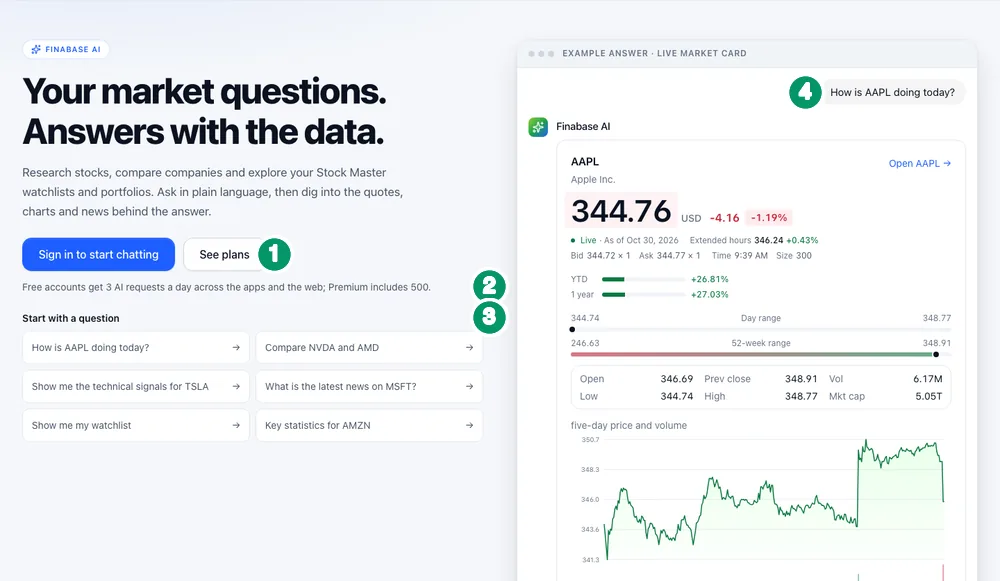
Click AI Chat in the header. Signed out, the page explains what the assistant does and shows an example answer with a live AAPL card:
- Sign in to start chatting (or See plans).
- The daily allowance — "Free accounts get 3 AI requests a day across the apps and the web; Premium includes 500."
- Start with a question — suggestions such as "How is AAPL doing today?", "Compare NVDA and AMD", "Show me the technical signals for TSLA", "What is the latest news on MSFT?", "Show me my watchlist" and "Key statistics for AMZN".
- The example answer.
After signing in, the page becomes a full-window chat: a sidebar of conversations on the left and the message box at the bottom, labelled "Send a message".
Asking good questions
- Name the symbol. "AAPL" is clearer than "Apple's stock"; type $ and pick from the list to mention a symbol exactly.
- Ask for one thing at a time. "Compare NVDA and AMD on valuation" gets a tighter answer than "tell me everything about chips".
- Use your own lists. "Which stocks in my watchlist are down more than 3% today?" works once you are signed in, because the assistant can read your watchlists, portfolios and alerts.
- Follow up. The assistant keeps the conversation's context, and can suggest follow-up questions.
Prompt templates
Type / (or use the + menu › Prompt templates) to insert a template: /quote, /compare, /signals, /news, /stats, /financials, /options, /trendscore, /watchlist, /portfolio, /alerts and /explain. Fill in the symbol and send.
Working with answers and chats
Under each answer: Copy, Read aloud, Regenerate, previous and next versions, and, for your own messages, Edit and Delete.
In the sidebar: New chat, Search, a Pinned group, and a menu on each chat to Pin, Rename, Download (Markdown, plain text or JSON), Archive or Delete. The top bar can Print or save as PDF, and before your first message you can switch on a Temporary chat that is not saved to your history.
Settings (in the account menu inside the chat) control whether Enter sends, widescreen mode, follow-up suggestions, message times, auto-scroll while an answer streams, and read-aloud speed. They are saved in that browser.
Keyboard shortcuts
| Shortcut (⌘ on Mac, Ctrl elsewhere) | Action |
|---|---|
| ⌘/Ctrl + Shift + O | New chat |
| ⌘/Ctrl + K | Search chats |
| Shift + Esc | Focus the message box |
| ⌘/Ctrl + Shift + S | Show or hide the sidebar |
| ⌘/Ctrl + Shift + C | Copy the last answer |
| ⌘/Ctrl + / | Show all shortcuts |
In the message box, Enter sends, Shift + Enter adds a line, and ↑ edits your last message.
Your daily limit
Every question you send counts as one request, even if the answer fails. Below the message box, "R of L AI requests left today" shows what remains. Limits by plan: Free 3, Essentials 30, Plus 100, Premium 500. On Free the three requests are shared with AI features in the Stock Master app. When you reach the limit, the chat says when it resets (midnight UTC) and links to the plans (Finabase plans on the web: Free, Essentials, Plus and Premium).
Frequently asked questions
Do I need an account to use AI Chat?
Yes. A free account includes three requests a day.
Which AI model does Finabase use?
The chat offers a single model, labelled Finabase AI, connected to Finabase's market data.
Are my chats private?
Chats are stored with your account so you can return to them. Use a Temporary chat for one you do not want kept, and Delete to remove any chat.
Why did a request count when the answer failed?
The request is counted when it is sent. If errors repeat, use Regenerate later or report it through Feedback.
Summary
Sign in, open AI Chat, and ask in plain language — with / templates and $ symbol mentions for speed. Answers arrive with live data cards; pin, rename, export or delete chats from the sidebar, and keep an eye on your daily allowance. On iPhone, see Trend Score and AI analysis in Stock Master.