
Web app · Research tools
Compare stocks side by side on finabase.io
Compare stocks and ETFs on finabase.io with quote tables, period returns, a chart rebased to the same start, and comparison sets synced with Stock Master.
On this page
"Is this stock doing well?" usually means "compared with what?". A 20% gain looks different when the S&P 500 rose 30% over the same months. Finabase gives you three ways to put symbols side by side: comparison sets you keep in your account, the Comparison tab on every symbol page, and the Compare box on any chart that overlays other symbols on the price.
This guide covers all three and explains why rebasing to a common start is the honest way to compare.
Comparison sets
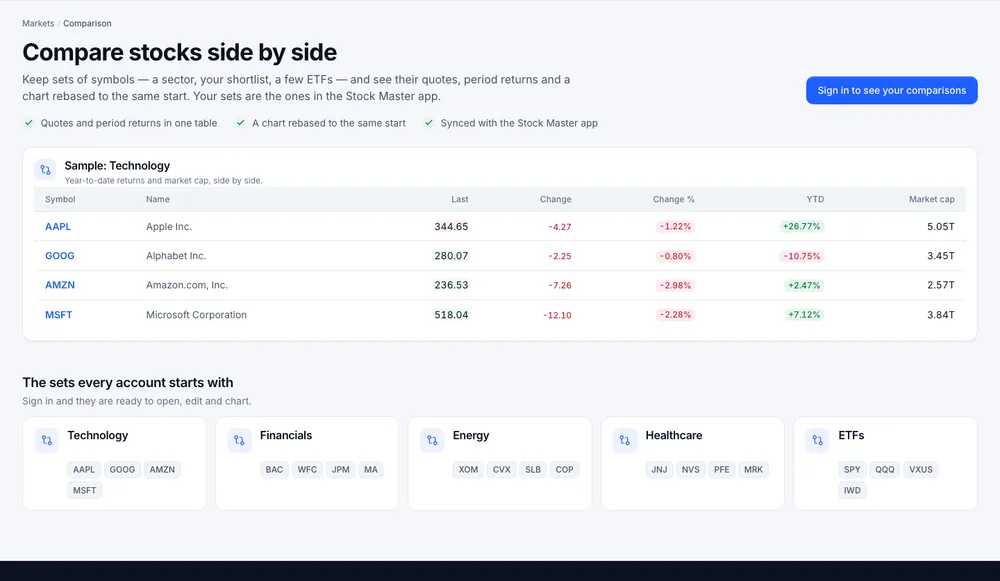
Open Research › Compare. Signed out, the page shows a sample Technology set — Apple, Alphabet, Amazon and Microsoft with last price, change, change %, YTD return and market cap — and the five starter sets every account begins with:
- Technology — AAPL, GOOG, AMZN, MSFT
- Financials — BAC, WFC, JPM, MA
- Energy — XOM, CVX, SLB, COP
- Healthcare — JNJ, NVS, PFE, MRK
- ETFs — SPY, QQQ, VXUS, IWD
Signed in, Your comparison sets lists your sets, searchable and sortable by title or symbol count. New comparison takes a Title and Create.
Inside a set
Open a set to see:
- Add a symbol and Add; Remove on each row.
- The quote table with period returns.
- Performance from the same start — every symbol's line starts at the same value on the first day of the range (two years by default), so the chart shows each one's percentage path rather than its share price.
- Side-by-side metrics — valuation and size measures in adjacent columns.
- Rename and Delete comparison….
Sets sync with the Stock Master app's comparison lists. They count toward your plan's list limit (Finabase plans on the web: Free, Essentials, Plus and Premium).
The Comparison tab on a symbol page
Every symbol page has a Comparison tab. By default it compares the symbol with SPY (the S&P 500) and QQQ (the Nasdaq-100) over one year. Type other tickers in Comparison symbols and press Compare symbols, or, signed in, pick one of your sets under Comparison set and Show set. You can add the current symbol to a set from here.
Overlays on any chart
On any full chart, the Compare… box in the toolbar adds another symbol as a line on the price pane. Each added symbol becomes a chip you can remove. This works signed out and is the quickest way to check one stock against its sector ETF (Interactive charts on finabase.io: ranges, chart types and controls).
Why rebase to the same start
Share prices are not comparable: a $500 stock moving $5 has moved 1%, a $50 stock moving $5 has moved 10%. Rebasing sets every line to the same value on the first day, so the distance between lines is the difference in percentage return over the period.
Two cautions:
- The start date matters. Starting the day after a crash or a peak can flip the picture. Try a few ranges.
- Price return is not total return. A high-dividend stock looks worse on a price chart than its holders actually did. See Risk and return: volatility, drawdowns and the equity premium.
Frequently asked questions
How many symbols can a set hold?
Sets are lists, so the per-list symbol limit of your plan applies. Charts stay readable with up to about six lines.
Can I compare an ETF with a stock?
Yes. Any symbols with prices can be compared, including indexes, ETFs, currencies and coins.
Do I need an account?
Not for the Comparison tab or chart overlays. Saved comparison sets need sign-in.
Why do the returns differ from another site?
Different start times (open versus previous close) and whether dividends are included change the figures. Finabase shows price return.
Summary
Keep sets of related symbols under Research › Compare, read their returns in one table and on one rebased chart, use the Comparison tab to measure a stock against the market, and overlay any symbol on a chart with Compare…. On iPhone, see Compare stocks side by side in Stock Master.