
Web app · Getting started
How to use Finabase Learn, the investing and trading library
Browse, search and follow Finabase Learn — sections and levels, the keyboard-friendly search, glossary links, sources, and the Try it in Finabase links into the app.
On this page
Finabase Learn is the library you are reading now: hundreds of free guides on investing basics, trading rules, technical and fundamental analysis, every chart indicator and candlestick pattern the app draws, economic data, market history and a glossary, plus step-by-step guides to the Finabase apps. Every article is written and fact-checked by Finabase Research, dated, and illustrated with figures built from real market data.
This guide shows how the library is organised, how to search it, and how articles connect back to the live tools on finabase.io.
The library home
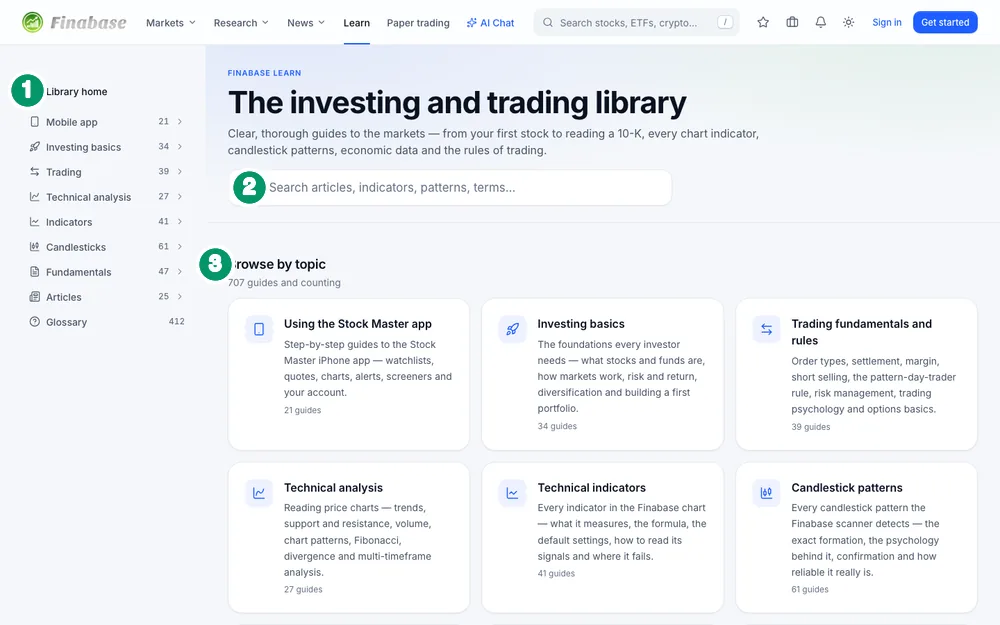
Click Learn in the header, or Finabase Learn in the footer. The home page has:
- The section rail — Library home and every section with its count of guides. On a phone it collapses into a Browse the library button.
- Search — "Search articles, indicators, patterns, terms…".
- Browse by topic — one card per section with a short description, then Recently updated articles and Popular topics, a cloud of tags with their counts.
The sections run from the app guides (the Stock Master iPhone app and this website) through investing basics, trading fundamentals and rules, technical analysis, technical indicators, candlestick patterns, fundamental analysis, economics, asset classes and longer articles, to the financial glossary. A section page groups its articles — "Momentum oscillators", "Order types" — and the glossary adds a Jump to letter A–Z bar.
Searching
Start typing in the search box and suggestions appear: article titles, indicator names, patterns and glossary terms, up to twenty at a time. Press ↓ and ↑ to move, Enter to open and Esc to close. Press Enter without choosing a suggestion to see a full results page ("12 results for 'rsi'"). Search also matches common alternative names, so "relative strength index", "P/E" or "ex-div" find the right page.
Reading an article
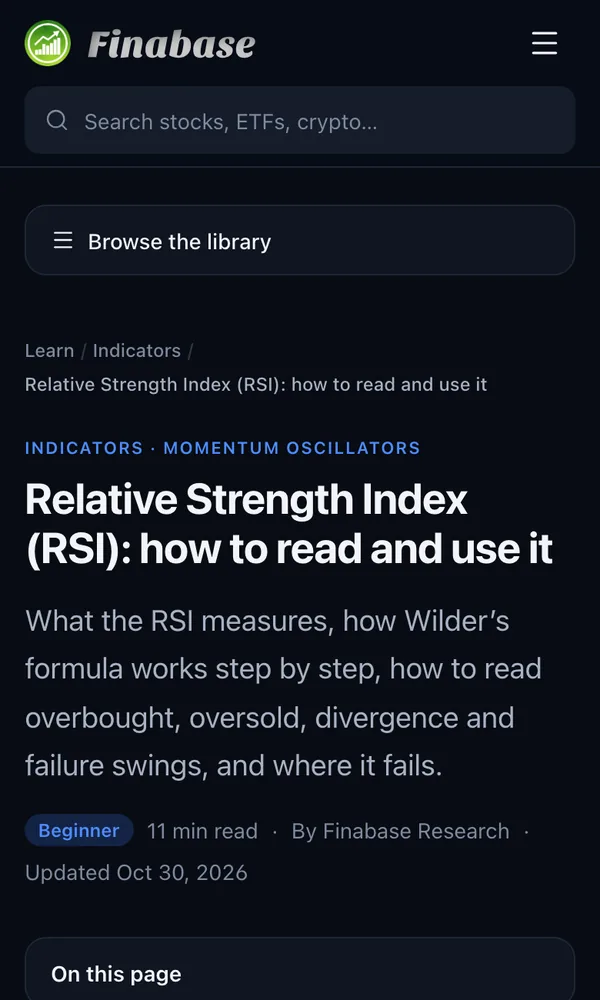
Every article follows the same shape, so you can skim:
- Header — section and group, the title, a level badge, reading time, the Finabase Research byline and the Updated date.
- On this page — a contents list for longer articles.
- Key takeaways — four to six bullets you could stop at.
- Body — definitions, worked examples, figures and tables. Figures follow your light or dark theme. Underlined terms link to the glossary or to related guides.
- Try it in Finabase — links that open the live tool, for example an Apple chart with the RSI already drawn or the scanner filtered to a pattern.
- Frequently asked questions, a Summary, Sources and further reading, topic tags, Previous / Next links within the section and Keep learning suggestions.
At the bottom, "Written and fact-checked by Finabase Research" gives the last review date, and Tell us opens the feedback form if you spot an error.
Using Learn with the app
Learn and the research tools are designed to be used side by side. For example, an indicator page can open a chart with that indicator at Finabase's default settings, and a fundamentals article can open a company's Valuation tab. In the other direction, see Interactive charts on finabase.io: ranges, chart types and controls for adding the indicators described here to any chart.
Tags (for example momentum or dividends) open a page listing every guide on that topic across sections.
Frequently asked questions
Is Finabase Learn free?
Yes. Every guide is free and open without an account.
Where do the numbers in the figures come from?
From Finabase's own market data, frozen on a stated date, or from cited public sources such as SEC filings and government statistics. Each article lists its sources.
Can I suggest a topic or report a mistake?
Yes. Use Tell us at the end of any article, which opens the Feedback page.
Does the iPhone app have the same library?
The library is on the web at finabase.io/learn and works in any phone browser. The iPhone guides themselves start at Getting started with Stock Master on iPhone.
Summary
Open Learn from the header, browse by section or tag, or search with the keyboard. Articles share one layout — takeaways first, then the detail, FAQs, a summary and sources — and their Try it in Finabase links put what you just read onto a live chart or scan.