
Web app · Watchlists, portfolios and alerts
Create and manage watchlists on finabase.io
Create watchlists on finabase.io, add and reorder symbols, switch between table, map and chart views, scan a list, and keep it in sync with the Stock Master app.
On this page
A watchlist is the list of symbols you check every day. On finabase.io your watchlists are the same lists you keep in the Stock Master app on iPhone and Android: add a stock on the website and it is on your phone a moment later. Each list streams live quotes and can be shown as a table, a heatmap, a page of charts or a grid of small charts, and you can run the technical scanner over any list in one click.
This guide covers creating lists, adding and arranging symbols, the views, scanning, and the plan limits.
Before you sign in
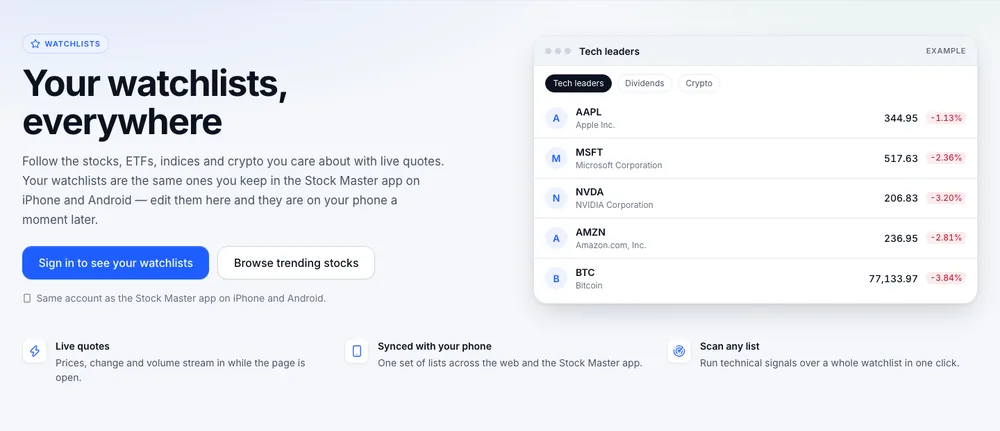
Signed out, Watchlists shows what the page does with an example list of live quotes, a Sign in to see your watchlists button and Browse trending stocks. Every symbol page also shows an example watchlist in its right rail. Sign in with the account you use in Stock Master and your own lists appear (Sign in to Finabase on the web and manage your account).
Your watchlists
Signed in, the page lists every watchlist as a card with its symbol count and a few symbols, with a search box and sorting by name or symbol count. New watchlist asks for a Name — "Dividend stocks", "Earnings this week" — and Create opens the new list.
Adding symbols
- On the list page, type a ticker into Add to this list and press Add. Stocks, ETFs, indexes, futures and coins all work.
- On any symbol page, click the star and choose the list.
Arranging and editing
Each row has an Edit button with Move up and Move down, and a Replacement symbol field to swap a ticker (useful after a ticker change). Remove deletes a row after a confirmation, and the symbol leaves the list on your phone too. Manage this watchlist at the bottom has Rename and Delete watchlist…, which asks twice and cannot be undone.
Views
Above the symbols, a summary shows the average move today, the symbol count, how many are advancing and declining, and the best and worst performers. The views are:
- Table — last price, change, change %, volume and market cap, sortable by column.
- Map — a heatmap of the list, sized by market cap and coloured by today's change.
- Charts — a chart per symbol, two to a row, sharing one range (1Y by default).
- Chart grid — smaller charts, three to a row, for spotting shapes quickly.
- Gauge — for each symbol, three gauges (Overlay, Indicator and Candlestick) counting its buy, neutral and sell signals, with a View all signals link.
Filter symbols narrows any view, and the export button downloads the list. These are the same views the screener and Trend Score use. For how the iPhone app arranges lists, see Watchlist view modes, sorting and filters in Stock Master.
Scanning a list
Scan this watchlist runs every indicator and candlestick signal over the list with your chart template, so you can see which of your own symbols just crossed a moving average or formed a pattern (Find today's technical signals with the Finabase scanner). You can also rank a watchlist with Trend Score (Rank stocks by trend quality with Finabase Trend Score) or ask the AI Chat about it (Ask Finabase AI: research stocks with the AI chat on the web).
Plan limits
| Plan | Watchlists and portfolios | Symbols per watchlist |
|---|---|---|
| Free | 4 | 80 |
| Essentials | 30 | 300 |
| Plus | 100 | 500 |
| Premium | Unlimited | Unlimited |
Watchlists and portfolios share one count. At the limit the New watchlist or Add control is hidden and the page says "You are using all 4 watchlists included with the Free plan", with Upgrade for more. After a downgrade, lists beyond the limit stay saved but cannot be opened until you upgrade or delete others (Finabase plans on the web: Free, Essentials, Plus and Premium).
Frequently asked questions
Do my Stock Master watchlists appear on the web?
Yes, when you sign in with the same account. Changes on either side sync.
Can I put crypto and ETFs in the same list?
Yes. Any symbol with a Finabase quote can go in any list.
Why can I not open one of my lists?
Your plan includes your first lists up to its limit; the others show "Upgrade to open this one". Upgrade, or delete lists to get under the limit.
Can I share a watchlist?
Not as a link today. Use the export, or a comparison set for a few symbols.
Summary
Sign in, create a list with New watchlist, add symbols from the list or the star on any symbol page, and switch between table, map and chart views. Scan the list for signals, and rely on it being the same list on your phone. On iPhone, see Create and manage watchlists in Stock Master.