
Web app · Research tools
The Finabase symbol page: quote, chart, financials and news
Read a Finabase symbol page — the live quote and extended-hours price, the quick chart, and the Summary, Financials, Earnings, Holders, Signals and other tabs.
Every stock, ETF, index, currency and coin on Finabase has a symbol page: a live quote at the top, a quick chart, and a row of tabs for the chart workspace, financial statements, valuation, earnings, dividends, holders, news, peers, comparisons, discussion and technical signals. It is where a search lands, and where most other pages link when you click a ticker.
This guide walks through the header, the quick chart and each tab, and notes which parts need an account.
The header and quick chart
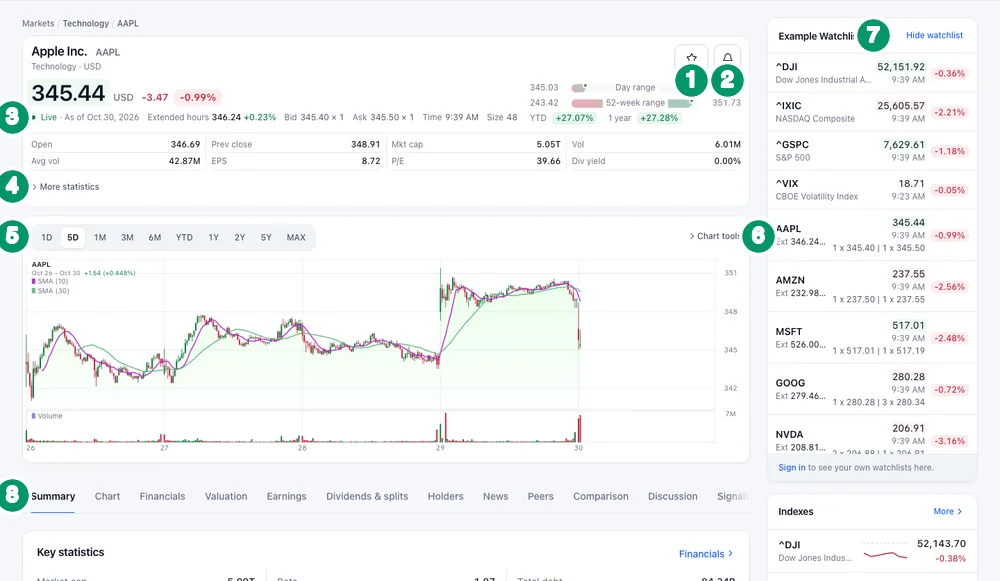
- Add to watchlist (star) — pick one of your lists.
- Set alert (bell) — "Alert when the price is" above or below a level. For percent-move and indicator alerts use the Alerts page (Set price, percent and indicator alerts on finabase.io).
- Quote line — Live or delayed status and the time, the Extended hours price and change (pre-market before 9:30 a.m. ET, after hours after 4 p.m.), bid and ask with sizes, the last trade time and size. To the right are the Day range, the 52-week range, and the YTD and 1 year returns.
- Key numbers — Open, Prev close, Mkt cap, Vol, Avg vol, EPS, P/E and Div yield. More statistics expands the list.
- Quick chart ranges — 1D, 5D, 1M, 3M, 6M, YTD, 1Y, 2Y, 5Y and MAX. Summary opens on 5D with two simple moving averages; the browser remembers the last range you chose.
- Chart tools expands the full toolbar in place. For the whole workspace, use the Chart tab (Interactive charts on finabase.io: ranges, chart types and controls).
- Watchlist rail — your watchlist (or an example list when signed out), the main indexes and trending symbols, each with a live price. Hide watchlist collapses it.
- Tabs — described below.
For what each number means, see How to read a stock quote: every field explained and Stock market hours: regular, pre-market, after-hours and overnight.
The tabs
| Tab | What it shows |
|---|---|
| Summary | Key statistics, analyst view, next earnings, financials quick view, earnings, upgrades and downgrades, about, news, holders, dividends, splits |
| Chart | The full chart workspace with your saved template |
| Financials | Income statement, balance sheet and cash flow, quarterly and annual |
| Valuation | Valuation ratios and financial-health measures over time |
| Earnings | Next report date and the history of EPS estimates, reported EPS and surprise |
| Dividends & splits | Ex-dividend dates and amounts, split history, a link to the dividend calendar |
| Holders | Top institutions and funds, insiders, recent Form 4 trades, ETFs holding it (or an ETF's own holdings) |
| News | Headlines for the symbol; an All sources / Benzinga only switch |
| Peers | Same-industry companies with YTD return and market cap |
| Comparison | The symbol against SPY and QQQ by default, or one of your comparison sets |
| Discussion | Public posts about the symbol; signing in lets you post |
| Signals | Today's indicator and candlestick signals with their values; hover for a one-year chart |
| Notes | Your private note on the symbol, synced with Stock Master |
| Options | The option chain, when the symbol has listed options |
| Alerts, Positions | Your alerts on the symbol, and your portfolio and paper-trading positions in it |
A Trend Score tab opens the symbol's trend analysis (Rank stocks by trend quality with Finabase Trend Score). Tabs with your own data — Notes, Alerts, Positions — ask you to sign in and are never indexed by search engines.
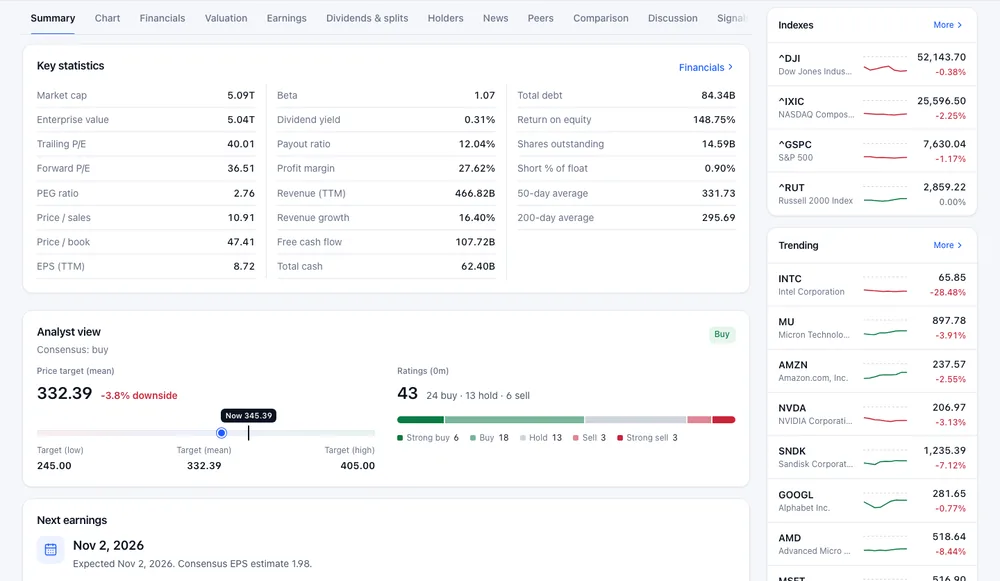
Reading the Summary tab
- Key statistics — market cap, enterprise value, trailing and forward P/E, PEG, price/sales, price/book, beta, margins, return on equity, revenue growth, cash flow, debt, shares outstanding, short percent of float and the 50- and 200-day averages. Financials jumps to the full statements.
- Analyst view — the consensus, the mean price target with its upside or downside from the current price, the low and high targets, and how many analysts rate it strong buy, buy, hold, sell or strong sell.
- Next earnings — the expected date and consensus EPS estimate, with an Earnings history link.
- Financials — quick view — revenue, net income and EPS bars; switch Quarterly or Annual.
Analyst targets and ratings summarise what brokers publish; they are opinions, not forecasts you can rely on. For a line-by-line tour of the statements behind these numbers, see How to read the Finabase financials tab.
On a phone
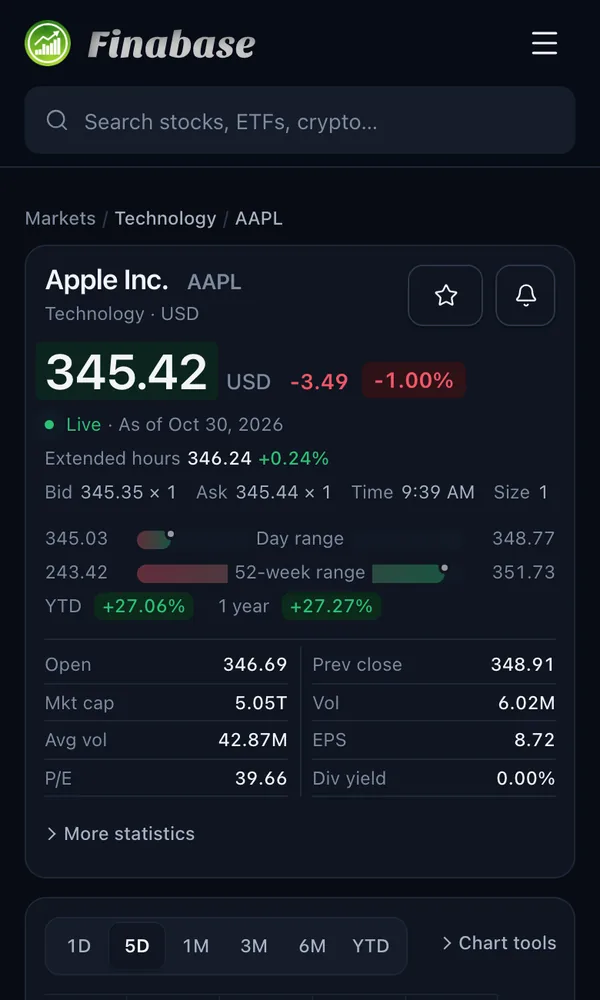
At phone width the watchlist rail moves below the content and the tabs scroll sideways.
Frequently asked questions
Why does the extended-hours price differ from the main price?
The main price is the last regular-session trade; the extended-hours price is the latest trade before 9:30 a.m. or after 4 p.m. Eastern. Both are shown so you can see overnight moves.
Why is there no Financials tab for some symbols?
Indexes, currencies, coins and many ETFs have no company financial statements, so the Financials, Valuation, Earnings and Options tabs are hidden for them.
Are the quotes realtime?
The status label says Live for streaming prices. Realtime data for all exchanges comes with the Plus and Premium plans (Finabase plans on the web: Free, Essentials, Plus and Premium).
Can I link straight to a tab?
Yes. Add the tab to the address, for example /symbol/aapl/earnings or /symbol/aapl/holders.
Summary
The symbol page is the hub for one security: live price and extended hours up top, a quick chart, and tabs from financials to discussion. Star or bell it to follow it, open Chart for full analysis, and use Summary for the one-screen overview. On iPhone the equivalent is The Stock Master quote screen, field by field.