
Web app · Watchlists, portfolios and alerts
Set price, percent and indicator alerts on finabase.io
Set Finabase alerts on the web for price levels, daily moves, volume, trailing stops and indicator signals, delivered by push in Stock Master or email.
On this page
An alert watches a stock so you do not have to. Tell Finabase "AAPL above $360", "TSLA down 5% today" or "NVDA's RSI turns bullish", and when it happens you get a push notification on your phone, an email, or both. Alerts you set on finabase.io are the same alerts as in the Stock Master app; the website is often the quickest place to set up several at once.
This guide covers the alert types, how to create and edit them, how they are delivered, and how to read their status.
Before you sign in
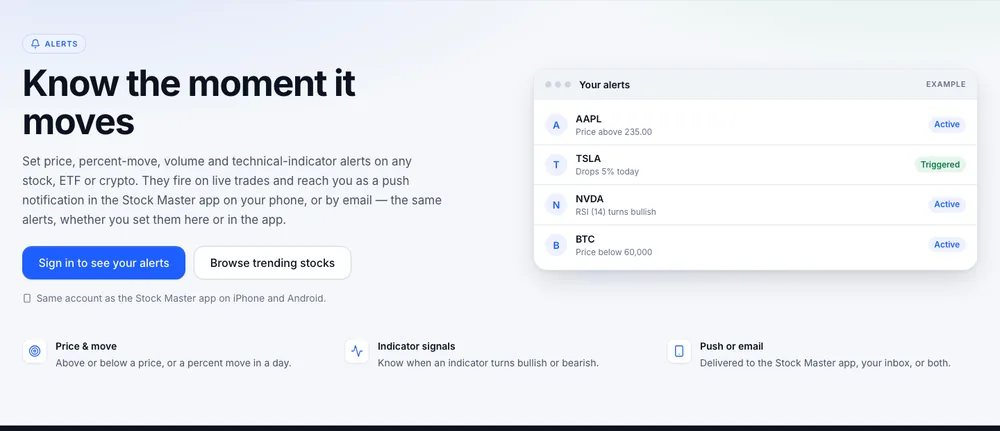
Signed out, Alerts shows example alerts — a price level, a percent drop, an RSI signal and a crypto price — and Sign in to see your alerts. Push notifications go to the Stock Master app, so install it and sign in there with the same account if you want alerts on your phone (Sign in to Finabase on the web and manage your account).
Creating an alert
On the Alerts page click New alert (or open /alert?symbol=AAPL to pre-fill the symbol and its
current price). Choose:
- Symbol.
- Alert type:
- Price — the price rises above or drops below a level.
- Daily price change and Daily price change % — today's move from the previous close, in dollars or percent.
- Daily volume — today's volume passes a number.
- Price change and Price change % — a move measured from the price when you save the alert.
- Trailing stop — price change and Trailing stop — price change % — the reference follows new highs (or lows), and the alert fires when price falls back by your amount. See Trailing stop orders: percent vs dollar trails, with real examples.
- Technical indicator — pick an Indicator, a Signal (Turns bullish or Turns bearish) and a Chart (Daily chart, 5-day chart or 1-day chart).
- When — Above or Below (or Rises or Drops) and the value: a price, percent, volume or amount.
- Note — optional; it is shown in the notification.
- Also email me at … — tick to receive an email as well.
Press Set alert.
A quick alert from a symbol page
Click the bell next to the price on any symbol page and enter a level under "Alert when the price is". A symbol's Alerts tab lists and manages that symbol's alerts.
Managing alerts
The page header counts active and triggered alerts and says where they will be delivered. Each alert shows its status — Active, Triggered, Removed or Failed — when it was set, when it triggered and at what price, and how it is delivered.
- Edit opens the alert in the form; saving a triggered alert re-arms it.
- Delete removes it, from your phone too.
- Search and sort by symbol, status, note, created, triggered or updated.
Choosing good alerts
- Price levels you would act on. An alert at support, resistance or your planned entry is useful; one every dollar is noise (Support and resistance: why price levels form and how to use them).
- Percent moves for news. A daily change % alert on a holding flags an unusual day before you open the app.
- Indicator alerts on the daily chart fire less often and more meaningfully than on the 1-day intraday chart.
- Alerts are not orders. An alert tells you; it does not trade. A stop order at your broker is what protects a position (Stop and stop-limit orders: triggers, gaps and non-fill risk).
Frequently asked questions
How many alerts can I set?
As many as you like. Alerts have no limit on any plan.
Why did I not get a push notification?
Push needs the Stock Master app installed and signed in with the same account, with notifications allowed. Tick the email option as a backup.
Do alerts work outside market hours?
Alerts are checked against live quotes. Crypto trades around the clock, so crypto alerts can fire at any hour; for stocks, most triggers come during trading sessions.
What happens after an alert triggers?
It moves to Triggered and stops. Edit and save it to arm it again.
Summary
Sign in, click New alert, choose a price, move, volume, trailing-stop or indicator condition, and decide on push, email or both. Use the bell on symbol pages for quick price alerts, and re-arm triggered alerts by saving them again. On iPhone, see Set price, percent and indicator alerts in Stock Master.