
Web app · Watchlists, portfolios and alerts
Practise with Finabase paper trading on the web
Fund a $10,000 virtual account on finabase.io, place market and limit orders at live prices, follow positions and gains, and reset to start over.
On this page
Paper trading lets you place orders with virtual money at real, live prices. Nothing reaches a broker and nothing you do can cost money, but the fills, gains and losses follow the actual market, so it is a safe way to learn how order types behave, test a plan for a few weeks, or get used to the size of daily swings before risking savings. Finabase's paper-trading account starts with $10,000 of virtual cash and is the same account as in the Stock Master app.
This guide covers funding the account, placing orders, reading the summary, and resetting.
The sample account
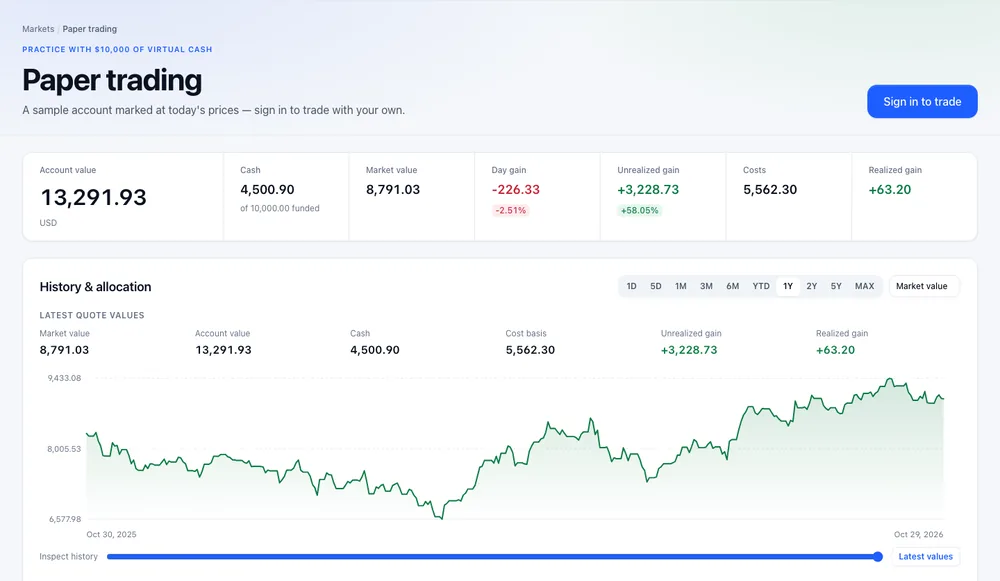
Open Paper trading from the header. Signed out, the page shows a sample account marked at today's prices — its value, cash out of the $10,000 funded, positions, gains and a one-year history — and Sign in to trade (Sign in to Finabase on the web and manage your account).
Funding your account
The first time you visit signed in, Start paper trading offers Fund my virtual account. Press it once and the account holds $10,000 of virtual cash. If you already paper trade in Stock Master, your existing account, positions and history appear instead.
Placing an order
Use Place an order on the paper-trading page, or open /trading/<symbol> (for example from a
symbol page's Positions tab › Trade):
- Symbol.
- Side — Buy or Sell.
- Order — Market (fill at the next trade) or Limit (fill only at your price or better). See Market vs limit orders: price certainty vs getting filled.
- Shares, and for limit orders the Limit price.
- Expires — Day (cancelled at the close if unfilled) or Good till cancelled (Time in force: day, GTC, IOC, FOK and other order durations).
Orders fill on the next matching trade in the live market. Unfilled orders wait under Open orders, where you can cancel them. Filled orders appear under Positions and Transaction history with price, shares, realised gain, and the position and average cost after each trade.
Reading the account
The summary across the top shows:
- Account value — cash plus the market value of positions.
- Cash — what remains of the funded amount ("of 10,000.00 funded").
- Market value — today's value of your positions.
- Day gain, Unrealized gain (open positions), Costs and Realized gain (closed trades).
History & allocation charts the account over time with the usual ranges (one year by default) and an Inspect history slider, and shows what share of the account each holding is.
Starting over
Reset this account › Remove all orders deletes every open and filled order, here and on your phone. It does not change the funded amount.
Using paper trading well
- Trade the size you would really trade. $10,000 in one meme stock teaches little about a real portfolio. See Position sizing: how many shares to buy for a set risk.
- Keep a journal. Note why you entered and what would make you exit (Trading plan and trading journal: what to write down).
- Expect real trading to feel different. Paper fills ignore queue position and your own emotions; slippage and nerves are real costs (Trading psychology: loss aversion, overconfidence and other biases).
Frequently asked questions
Is paper trading free?
Yes. It needs a free account.
Does paper trading use real prices?
Yes. Orders fill against live market trades; only the money is virtual.
Can I add more virtual cash?
The account is funded once with $10,000. Resetting removes your orders but does not change the funding.
Can I short or trade options on paper?
The web order form offers buy and sell, market and limit orders. For short trades in a real portfolio record, use Sell short in a portfolio (Track portfolios and trades on finabase.io).
Summary
Sign in, fund the virtual account once, and place market or limit orders at live prices. Follow cash, positions and gains in the summary and history chart, cancel open orders as needed, and reset when you want a clean slate. Treat results as practice for the real thing, not a forecast of it.