
Web app · Research tools
Market news and Discover stories on finabase.io
Follow breaking market headlines on finabase.io, browse Discover stories by topic or your own keywords, and find the news for a single stock.
On this page
Prices tell you what moved; news usually tells you why. finabase.io collects market headlines from major business and financial publishers as they break, and a second feed, Discover, of longer stories, explainers and investing reads grouped by topic. Each stock's page has its own news tab, and the AI Chat can summarise the latest headlines for a symbol on request.
This guide covers the News page, Discover's topics and custom search, per-symbol news, and how to read market news critically.
Market news
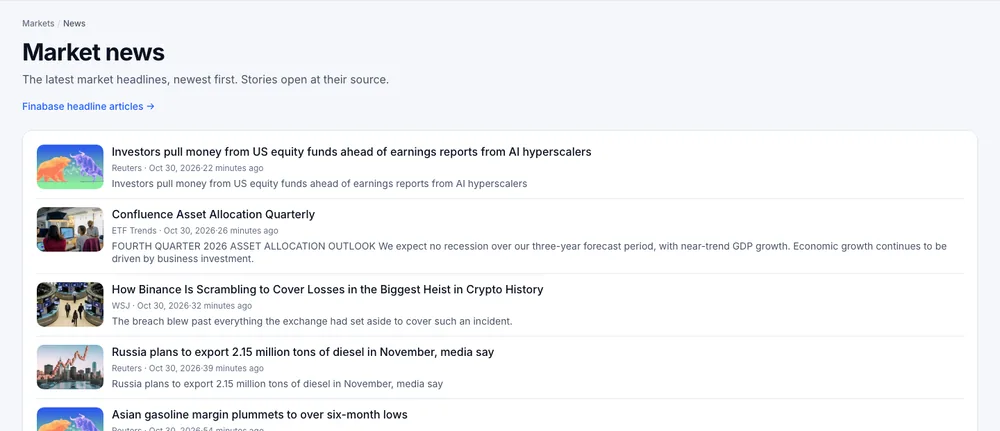
Open News › News. Each row has a thumbnail, the headline, the publisher, the time and how long ago it was published, and a short summary. Click a headline to open the story; where Finabase shows a story page, Read the original takes you to the publisher's site. Publishers include Reuters, The Wall Street Journal, Barron's and Investopedia, among others; what appears depends on what they publish.
Finabase headline articles links to Finabase's own topic pages.
Discover

News › Discover is a magazine-style grid of stories with images. The tabs are:
- General — the broad market mix (default).
- Economy and Fed — macro data, interest rates and central-bank news. For background, see How interest rates affect stocks: discount rates and equity duration.
- Tech, Earnings, Dividends, Value Stocks and Growth Stocks — themed feeds.
- Custom — type your own Keywords, such as "bitcoin, inflation, energy stocks", and press Search. Custom searches are rate-limited to keep the service fair (about 20 a minute per visitor).
- Stories — longer reads.
Each card shows how long ago the story appeared, its headline and a summary. Open one for the summary page and Read the original.
News for one stock
On any symbol page, the Summary tab shows the latest few headlines and the News tab shows the full list. All sources / Benzinga only filters to one wire. Use it alongside the chart: a headline that coincides with a price gap or a volume spike is usually the reason for it.
For earnings-related news, the Earnings tab and the earnings calendar give the dates and the numbers behind the headlines (Earnings calendar, ex-dividend dates and insider trades on Finabase).
Reading the news well
- Headlines are written to be clicked. Read past the headline before reacting; the body is often more measured.
- "Stocks fall on X" is a story told after the fact. Many moves have several causes; the headline picks one.
- Check the date. Old stories resurface; the time stamp shows when it was published.
- Watch the reaction. Whether the price moved, and on what volume, tells you how much the market cared. See What moves stock prices? Earnings, rates, flows, news and sentiment.
Frequently asked questions
Is the news delayed?
Headlines appear as the publishers release them, typically within minutes. Some publishers' articles require a subscription on their own sites.
Can I get news for my watchlist only?
Use each symbol's News tab, or ask the AI Chat "What is the latest news on my watchlist?" after signing in (Ask Finabase AI: research stocks with the AI chat on the web).
Why do some Discover tabs show few stories?
Topic feeds depend on what was published recently. Try General or a Custom keyword search.
Do I need an account for news?
No. News, Discover and symbol news are free and open.
Summary
Use News for the breaking market wire, Discover for topic feeds and your own keyword searches, and each symbol's News tab for company headlines. Read past the headline and check the price reaction. On iPhone, see Market news, custom news feeds and discussion in Stock Master.