
Web app · Charts
Add indicators, drawings and chart templates on finabase.io
Add and tune indicators and candlestick patterns on a Finabase web chart, draw trend lines and Fibonacci levels, and save chart templates per range or by name.
On this page
A bare price chart answers "where has it been?". Indicators and patterns add "how fast, how stretched, how unusual?", and drawings mark the levels you care about. Finabase's web chart offers the full library the iPhone app has — moving averages and bands drawn over the price, oscillators in their own panes, 61 candlestick patterns marked on the bars — plus five drawing tools and chart templates that save the whole setup.
This guide covers adding and editing indicators, the defaults Finabase uses, the drawing tools, and the Chart settings page where templates live.
Adding an indicator
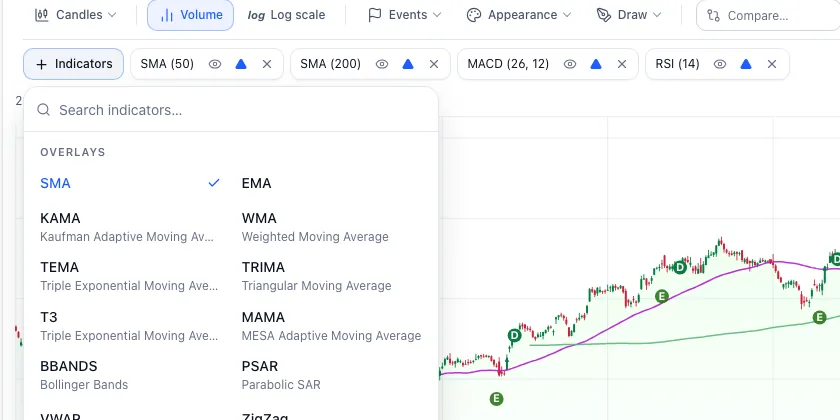
Click + Indicators under the chart toolbar. Type to filter ("rsi", "bollinger", "doji") or scroll the three groups:
- Overlays, drawn on the price: SMA, EMA, KAMA, WMA, TEMA, TRIMA, T3, MAMA, Bollinger Bands (20, 2), Parabolic SAR (0.02, 0.2), VWAP and ZigZag.
- Indicators, in their own panes: MACD, APO, RSI, Williams %R, MFI, CCI, CMO, DX, Momentum, ROC and its variants, TRIX, TSF, ADX, ADXR, Aroon and Aroon Oscillator, ATR and NATR, DEMA, Beta, Correlation, OBV, Chaikin Oscillator, Ultimate Oscillator, Slow and Fast Stochastic and StochRSI.
- Candlestick patterns — 61 TA-Lib patterns, from Doji and Hammer to Three White Soldiers, each marked on the bars where it forms.
Click a name to add it. It appears as a chip next to the button:
- Click the chip's name to edit parameters (period, standard deviations, fast and slow lengths), then Apply or Cancel.
- Eye hides or shows it without removing it.
- Triangle toggles crossover markers — arrows where price crosses an overlay, or where an oscillator crosses its signal or threshold.
- × removes it.
Every indicator and pattern has a guide in this library explaining the formula and how to read it — start with Simple moving average (SMA): formula, crossovers and limits, MACD indicator: signal line, histogram and divergence and Relative Strength Index (RSI): how to read and use it.
The defaults
A chart with no saved settings starts with two simple moving averages chosen for the range, plus MACD (12, 26, 9) and RSI (14):
| Range | Short SMA | Long SMA |
|---|---|---|
| 1D | 30 | 50 |
| 5D | 10 | 30 |
| 1M | 10 | 50 |
| 3M | 30 | 50 |
| 6M | 50 | 100 |
| YTD, 1Y, 2Y | 50 | 200 |
| 5Y, MAX and minute intervals | 10 | 30 |
Drawing on the chart
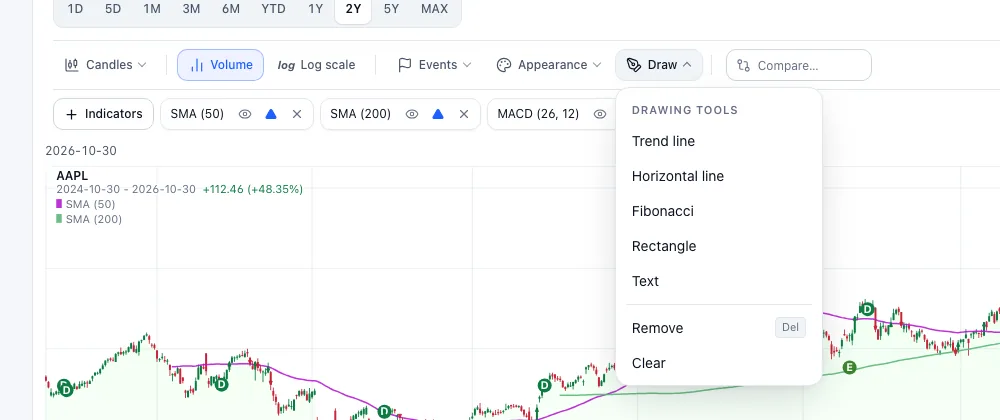
Open Draw and pick a tool, then click on the chart:
- Trend line — click two points. See Trends and trendlines: how to identify a trend and draw it correctly.
- Horizontal line — one click marks a price level, such as support or resistance (Support and resistance: why price levels form and how to use them).
- Fibonacci — click the swing low and high; levels are drawn at 0, 23.6, 38.2, 50, 61.8, 78.6 and 100% (Fibonacci retracements: levels, extensions and real evidence).
- Rectangle — marks a zone or a consolidation.
- Text — a note on the chart.
Click a drawing to select it; Remove (or the Delete key) deletes it and Clear removes all. Esc cancels a tool. Signed in, drawings save automatically for that symbol; signed out they last until you leave the page.
Chart settings and templates
Research › Chart settings needs an account. It holds two kinds of saved setup:
- Defaults by range — what each range (1D, 5D … MAX, each minute interval, and a generic default) shows when you open a chart. These are what the Chart tab saves to automatically.
- Your templates — named setups, shown as cards with their counts of overlays, indicators and candlestick patterns. New template takes a Template name, copies a range's settings (1Y by default) and Create template.
Open a template or a range to edit it on a Preview chart (any symbol; AAPL by default), then Rename template, set its Default range, Apply template to a range, Reset to defaults, or Delete template…. Templates sync with Stock Master, and a watchlist scan can use one so its signals match your charts (Find today's technical signals with the Finabase scanner). On a symbol's Chart tab, the Chart settings panel picks a template for the current chart.
Templates count toward your plan's list limit (Finabase plans on the web: Free, Essentials, Plus and Premium).
Frequently asked questions
How many indicators can I add?
There is no fixed limit, but each oscillator adds a pane. Three or four studies are usually all a chart can show clearly.
Why do my indicator values differ from another site?
Different defaults (SMA versus EMA, 14 versus 9 periods), data (adjusted or unadjusted prices) and warm-up periods give different values. Check the chip's parameters.
Do drawings sync with the iPhone app?
Drawings are saved with your account per symbol; chart templates and per-range settings are shared with Stock Master.
Can I share a chart with indicators?
Yes. Chart links can carry the indicators in the address; Learn articles use this to open charts with a study ready.
Summary
Add studies from + Indicators, tune them from their chips, mark levels with Draw, and save the setup per range or as a named template in Chart settings. On iPhone, see Add indicators and candlestick patterns to Stock Master charts.