
Web app · Getting started
Getting started with Finabase on the web: a tour of finabase.io
Find your way around finabase.io — the Markets, Research and News menus, symbol search with the / shortcut, the theme switch and what works without an account.
On this page
Finabase on the web is the browser version of the Stock Master apps: live quotes, interactive charts with more than a hundred indicators and candlestick patterns, screeners and scanners, market news, an AI research assistant, and your own watchlists, portfolios and alerts. It runs in any modern browser on a desktop, a tablet or a phone, and it uses the same account as the iPhone and Android apps, so a list you build on one shows up on the other.
This guide is the first ten minutes: what is on the home page, where each menu leads, how to find a stock quickly, how to switch between light and dark mode, and what you can do before you sign in. Each area has its own guide in this section, linked at the end.
The home page and header
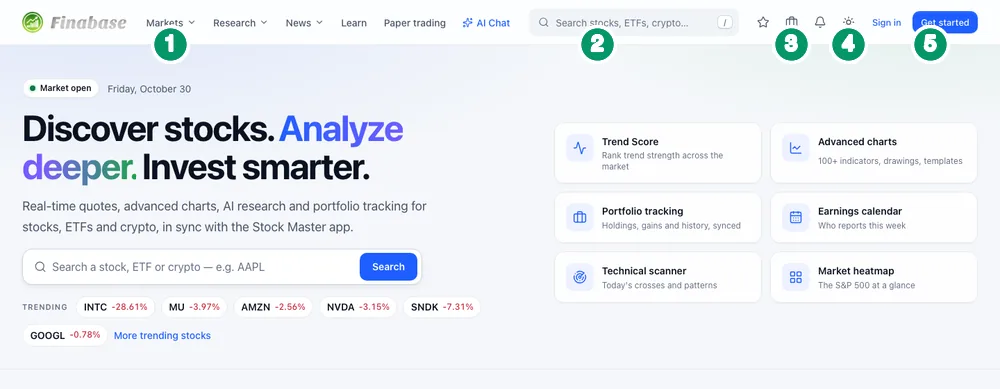
The home page opens with the market's state — a Pre-market, Market open or After hours badge and today's date — and a search box, a row of Trending symbols with their percent change, and six shortcuts: Trend Score, Advanced charts, Portfolio tracking, Earnings calendar, Technical scanner and Market heatmap. Below them are live index and futures cards with today's intraday path, a sector heatmap, the most active stocks, sector breadth, the latest news, the scanner's top movers and Discover stories (Market overview, heatmap and sectors on finabase.io walks through the market pages). The page refreshes its data every few minutes while the tab is open, and the quote cards stream live prices in between.
The header is the same on every page:
- Markets — Overview, Indices, Sectors, Heatmap, Performers, Trending, Earnings, Dividends, Crypto, Forex, Futures and Treasury. Research — Screener, Scanner, Trend Score, Insider trading, Compare, Options, Backtest, Strategy and Chart settings. News — News and Discover. Then Learn, Paper trading and AI Chat.
- Search — type a ticker or a company name ("apple", "AAPL", "bitcoin").
- Watchlists, Portfolios and Alerts — your own lists. Signed out, each leads to the sign-in page and back.
- Theme — System, Light or Dark.
- Sign in and Get started (create an account). Once you are signed in, your avatar replaces them and opens a menu with Your profile, Subscription, Feedback and Sign out.
Finding a symbol
Click the search box or press / from anywhere on the site (except while you are typing in another field). Suggestions appear as you type — up to ten stocks, ETFs, indices, currencies and coins. Use ↑ and ↓ to move through them, Enter to open one, and Esc to close the list. If you press Enter on a ticker without picking a suggestion, Finabase opens that symbol directly; otherwise you land on a Search results page listing matching symbols across exchanges — AAPL on Nasdaq, AAPL.NE in Canada, APC.DE in Germany and so on.
Every symbol opens on its own page, covered in The Finabase symbol page: quote, chart, financials and news.
On a phone
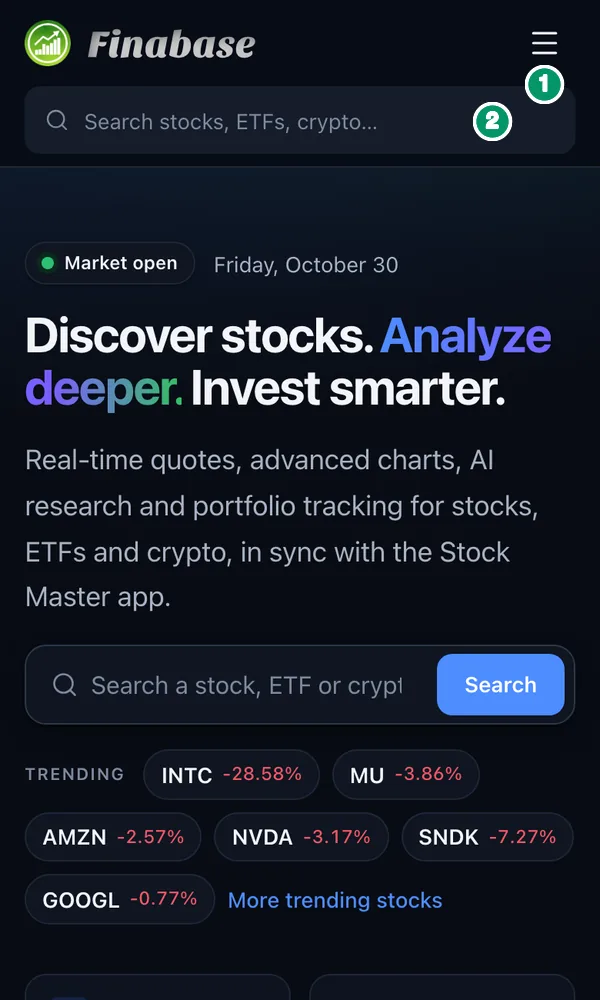
Below tablet width the menus fold into a single menu button at the top right, and the search box moves under the logo. The menu holds the same links as the desktop header, your account links, a theme switch and Sign in or Sign out. Wide tables — screener results, earnings lists — scroll sideways; charts accept pinch and drag.
Light and dark mode
The theme button cycles System (follow your device), Light and Dark. The same switch is in the footer and in the phone menu. The choice is stored in that browser only, so a second computer starts on System until you change it there.
What works without an account
You can use nearly all of Finabase's research tools signed out: quotes, charts with every indicator, drawing tools, the screener and its builder, the scanner, Trend Score, heatmaps, earnings and dividend calendars, insider trading, news, Discover and this Learn library (How to use Finabase Learn, the investing and trading library). Pages that hold your own data — watchlists, portfolios, alerts, saved screens, comparison sets, backtests, strategies, chart templates, paper trading and AI Chat — show a short preview with example data and a Sign in button. See Sign in to Finabase on the web and manage your account.
Frequently asked questions
Is finabase.io free?
Yes. The research tools are free to use. A free account adds four watchlists or portfolios and three AI requests a day; paid plans raise those limits. See Finabase plans on the web: Free, Essentials, Plus and Premium.
Do I need to install anything?
No. Finabase runs in the browser. The Stock Master app for iPhone and Android is optional and shares the same account; the Get the app page has store links and QR codes.
What is the keyboard shortcut for search?
Press /. It focuses and selects the header search box from any page.
Is the iPhone app the same as the website?
They share the account and data. Screens differ, so features are documented separately; the iPhone guides start at Getting started with Stock Master on iPhone.
Summary
finabase.io puts the market behind three menus — Markets, Research and News — plus Learn, Paper trading and AI Chat. Press / to search, open any symbol for its quote and chart, and switch the theme with the sun button. Everything that reads the market works signed out; sign in when you want your own watchlists, portfolios, alerts and AI answers, in sync with the Stock Master app.