
Web app · Research tools
Market overview, heatmap and sectors on finabase.io
Read the whole market at a glance on finabase.io — index and futures cards, the S&P 500 heatmap, sector breadth, top performers, trending stocks and other asset classes.
On this page
Before looking at a single stock it helps to know what the whole market is doing: are the major indexes up or down, is the move broad or carried by a few giants, which sectors lead, and what traders are piling into. The Markets menu on finabase.io answers those questions with live pages for indexes, futures, sectors, a market-cap heatmap, top performers, trending symbols and the other asset classes — crypto, currencies, futures and Treasury yields.
This guide covers the Overview page, the heatmap, sectors, performers and trending lists, and how to read them without over-reading them.
Overview: indexes, futures and the day's shape
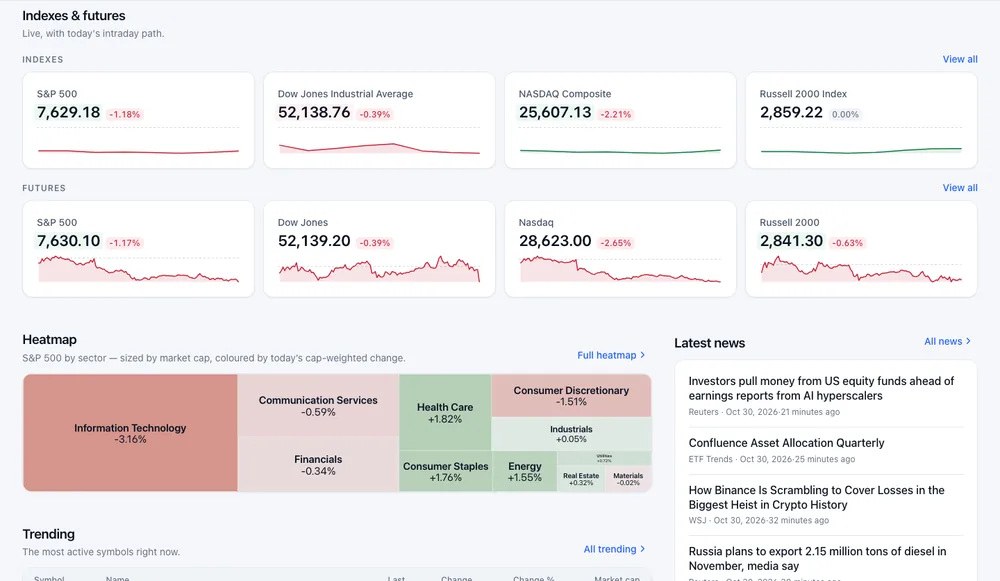
Open Markets › Overview. Below the search box are:
- Indexes — the S&P 500, Dow Jones Industrial Average, Nasdaq Composite and Russell 2000, each with its level, percent change and a sparkline of today's path. View all opens the world indexes page.
- Futures — the matching index futures, which trade nearly around the clock and show where the market is leaning before the open.
- Heatmap — the S&P 500 by sector, coloured by each sector's cap-weighted change.
- Trending, Sector breadth, Latest news, Market movers from the scanner, and Discover stories.
The cards update live while the page is open.
The heatmap
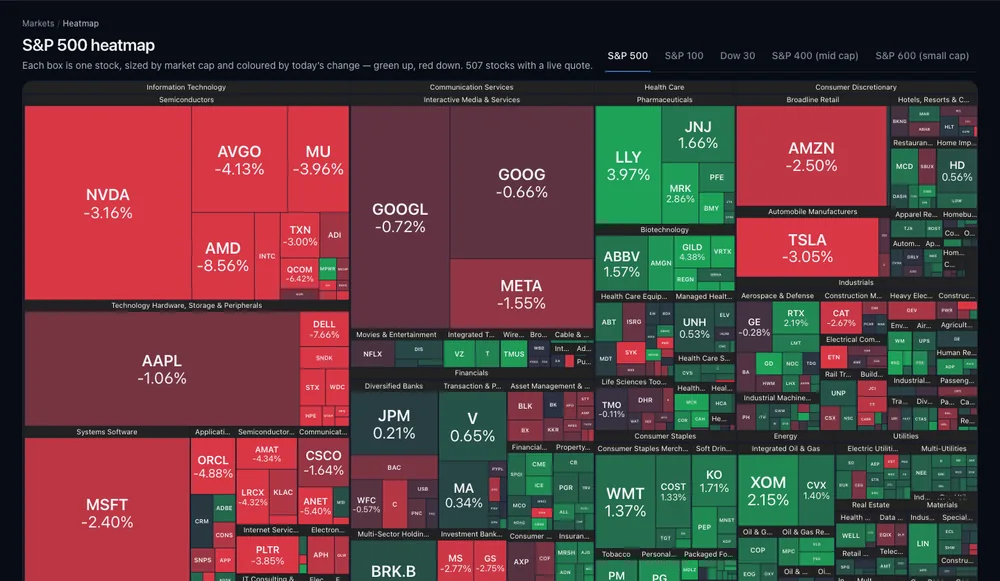
Markets › Heatmap draws every member of an index as a box. The box's size is its market capitalization and its colour is today's percent change — deeper green for bigger gains, deeper red for bigger losses. Boxes are grouped by sector, then by industry, so you can see at a glance whether a sell-off is everywhere or concentrated in one corner.
- Tabs switch S&P 500, S&P 100, Dow 30, S&P 400 (mid cap) and S&P 600 (small cap).
- Hover a box for a preview with the price and change; click it to open the symbol page.
- Click a sector or industry label to zoom into it; Esc closes a preview.
Because size follows market cap, a handful of mega caps fill much of the S&P 500 map. A red morning for NVDA, MSFT and AAPL can make the map look worse than the typical stock is doing. Compare it with the equal-weighted view on the Sectors page, and see Market concentration: what mega caps mean for S&P 500 investors.
Sectors and breadth
Markets › Sectors splits the market into the 11 GICS sectors (Stock market sectors and industries: GICS and sector ETFs explained) and shows breadth — how many stocks in each are advancing versus declining today — plus each sector index's performance over several periods. Open a sector for its stocks, with Advancing, Declining and Stocks tiles and the same table, map and chart views as a watchlist.
Breadth answers a different question from index change: an index can rise while most of its stocks fall. See Relative strength and market breadth: ratio lines, A/D and % above MA.
Performers and trending
- Performers ranks an index's best and worst stocks. Choose the Index (S&P 500, S&P 100 or Dow Jones 30), the Return period (one day up to five years or max), and Results per side (15, 30, 50 or 100), then Update ranking.
- Trending lists the most active symbols in four lanes: trending now, trending during the session, pre-market movers and after-hours movers.
Other asset classes
The Markets menu also has Indices (world indexes), Crypto, Forex, Futures and Treasury (yields across the curve). Each is a live list with the same table, map and chart views, and every row opens a symbol page with a chart.
Frequently asked questions
Why are some heatmap boxes so small I cannot read them?
Small companies get small boxes by design. Hover for the details, or switch to the S&P 400 or S&P 600 tab to see mid and small caps at a readable size.
How often does the heatmap update?
It uses live quotes, so the colours change through the session. Reload or revisit to rebuild the layout.
Is the overview available before the market opens?
Yes. Before 9:30 a.m. ET the page shows a Pre-market badge, futures are live, and extended- hours prices appear on the stock pages.
Does the heatmap cover ETFs or crypto?
No. It covers index members. Use the Crypto page, or a watchlist's Map view, for other symbols.
Summary
Start the day on Overview for indexes, futures and the sector map, open the Heatmap to see which companies drive the move, check Sectors for breadth, and use Performers and Trending to find what is moving. On iPhone, the same tools are covered in Market map and sector performance in Stock Master.