
Web app · Getting started
Finabase plans on the web: Free, Essentials, Plus and Premium
Compare the four Finabase plans on finabase.io — list and symbol limits, daily AI requests, realtime data — and learn how to subscribe, manage or cancel.
On this page
Finabase has one subscription that covers the website and the Stock Master apps for iPhone and Android. Subscribe once, wherever you like, and your plan applies everywhere you sign in with the same account. The research tools — quotes, charts, screeners, scanners, news — stay free on every plan; what a plan changes is how much of your own data you can keep, how many AI answers you get each day, and whether quotes are realtime.
This guide explains the four plans, the Premium Data add-on, how to subscribe on the web, and how to change or cancel.
Compare plans
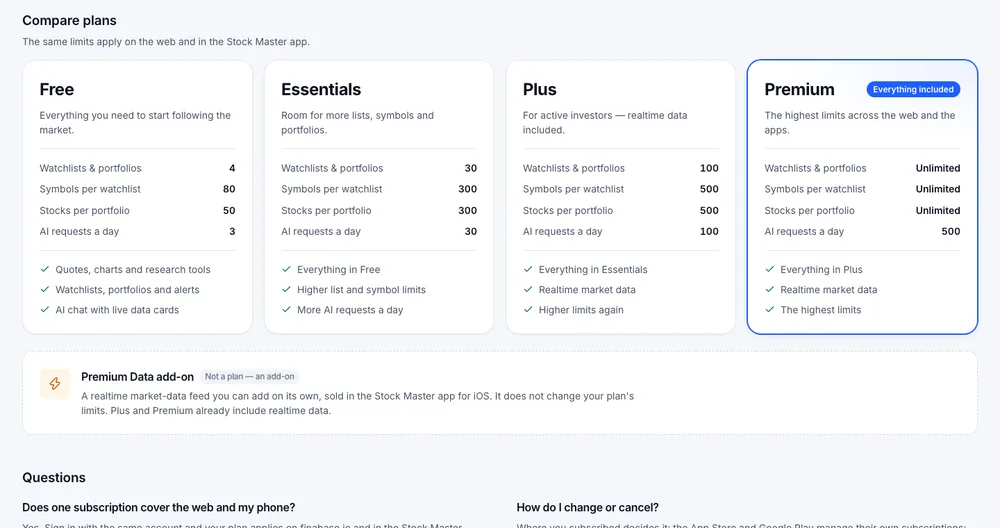
Open Plans & pricing from the avatar menu (Subscription) or the footer. The cards list the same limits the apps enforce:
| Limit | Free | Essentials | Plus | Premium |
|---|---|---|---|---|
| Watchlists and portfolios | 4 | 30 | 100 | Unlimited |
| Symbols per watchlist | 80 | 300 | 500 | Unlimited |
| Stocks per portfolio | 50 | 300 | 500 | Unlimited |
| AI requests a day | 3 | 30 | 100 | 500 |
| Realtime market data | — | — | Yes | Yes |
The "lists" limit also counts saved screens, chart templates, comparison sets, backtests and strategies. Price, percent-move and indicator alerts have no limit on any plan.
AI requests are counted per day and reset at midnight UTC. On Free, the three requests are shared by every AI feature, on the web and in the apps.
Prices are shown in the checkout itself rather than on the comparison cards, because they can differ by store and region.
The Premium Data add-on
Premium Data is not a plan. It is a realtime market-data feed sold separately in the Stock Master iOS app. It does not change list limits or AI requests. Plus and Premium already include realtime data, so you only need the add-on for realtime quotes on Free or Essentials. Your account page shows whether it is active.
Subscribing on the web
Sign in first. On the Free plan, the pricing page shows a Subscribe on the web panel with a secure Stripe checkout. After paying, your new limits apply on the web and in the apps as soon as the page reloads.
If you already pay through the App Store or Google Play, the web shows your current plan instead of a checkout. Use the same store to upgrade.
Changing or cancelling
The pricing page tells you where your plan was bought and how to manage it:
- Bought on the web (Stripe) — use Manage billing, or the link in your Stripe receipt email.
- App Store — iPhone Settings › your name › Subscriptions.
- Google Play — Google Play › Payments & subscriptions › Subscriptions.
There is no separate "restore purchases" step on the web. Signing in with the account that holds the subscription is enough.
What happens to my lists if I downgrade?
Nothing is deleted. Lists beyond the new plan's limit stay saved; you can open your first lists up to the limit, and the rest show "Upgrade to open this one" until you upgrade again or delete some to get under the limit. At the limit, the page shows "You are using all 4 watchlists included with the Free plan" with an Upgrade for more link.
Frequently asked questions
Does one subscription cover the website and my phone?
Yes. Sign in with the same account and the plan applies on finabase.io and in the Stock Master apps for iOS and Android.
Is Finabase free?
Yes. Quotes, charts, screeners, scanners, heatmaps, news and Learn are free and work without an account. A free account adds four lists and three AI requests a day.
Which plan has realtime prices?
Plus and Premium. On Free and Essentials, the Premium Data add-on from the iOS app adds realtime data.
Do alerts count against my plan?
No. Alerts have no limit on any plan.
Summary
Free covers the research tools and a few lists; Essentials, Plus and Premium raise the limits on lists, symbols and AI requests, and Plus and Premium add realtime data. Subscribe on the web through Stripe or in the app stores; manage the plan where you bought it. The iPhone view of the same plans is in Stock Master plans: Essentials, Plus and Premium compared.