
Web app · Research tools
Find today's technical signals with the Finabase scanner
Use the Finabase technical scanner on the web to see which indicator, candlestick and mover signals fired today on an index, an exchange or your own watchlist.
On this page
Where the screener asks "which stocks match my rules?", the scanner asks "what happened today?". After each session Finabase runs every indicator and candlestick pattern in the chart library over every stock on an exchange, records which ones produced a bullish or bearish signal on the latest bar, and counts the matches. The scanner page shows those counts as cards; pick one and you get the stocks, each opening on a chart with that indicator already drawn.
This guide covers the scanner page, the three signal groups, scanning your own watchlist, and the limits of signal counts.
The scanner page
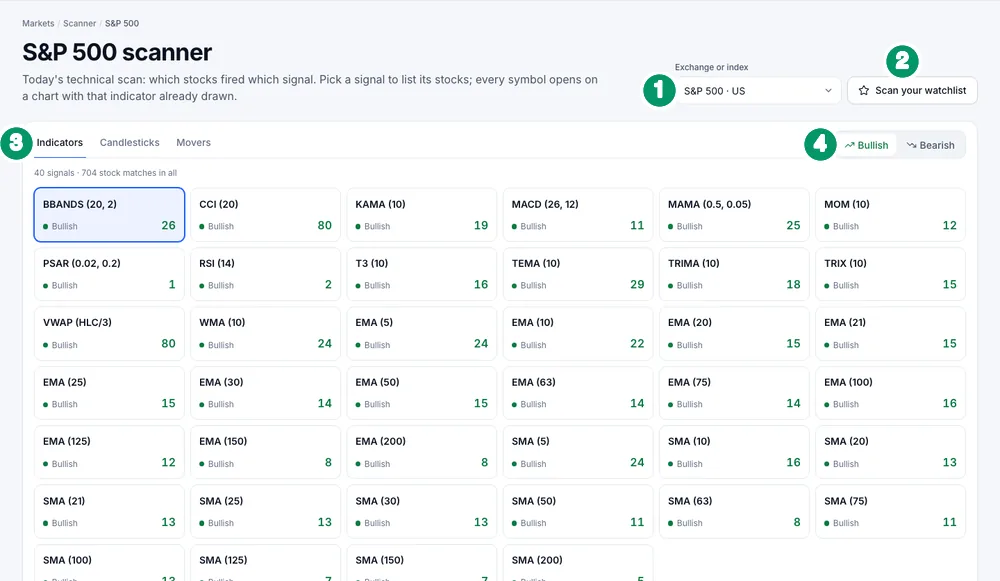
Open Research › Scanner. It reopens the last scan you used in that browser, or the S&P 500.
- Exchange or index — the S&P 500, other indexes, US exchanges and foreign markets, 19 in all.
- Scan your watchlist — see below.
- Signal groups — Indicators (moving averages, MACD, RSI, Stochastics, Bollinger Bands, Parabolic SAR, VWAP, Williams %R and the rest of the library), Candlesticks (the candlestick patterns) and Movers (price and volume moves).
- Bullish / Bearish — which side of each signal to count.
The line above the cards totals them, for example "40 signals · 704 stock matches in all". Each card shows the study with its settings — BBANDS (20, 2), RSI (14), SMA (50) — its direction and the number of matching stocks. Click a card to list the stocks below, sorted by market cap; click a symbol to open its chart with that study drawn and the signal marked.
What a "signal" means here
Each study defines its own bullish and bearish events. A moving average signals when price crosses it; the RSI when it leaves an oversold or overbought zone; MACD when it crosses its signal line; a candlestick pattern when the pattern completes on the latest bar. The indicator and pattern guides in this library explain each rule — for example Relative Strength Index (RSI): how to read and use it, MACD indicator: signal line, histogram and divergence and Bollinger Bands: formula, the squeeze and walking the bands.
Scanning your watchlist
Scan your watchlist (or Scan this watchlist on a watchlist page) runs the signals over one of your own lists. It needs an account. The Scan settings let you choose:
- Chart template — which saved set of indicators to scan with, so the scan matches the charts you actually use (Add indicators, drawings and chart templates on finabase.io).
- Scan range — End of day (default) or Intraday.
- Recent bars — how many of the latest bars count, 1 to 10, 15 or 20 (default 6).
Press Run scan, then flip Bullish / Bearish to see each side. Edit watchlist and Edit chart templates jump to the lists behind the scan.
Reading the counts sensibly
- Big counts often mean a market-wide move. On a broad rally dozens of moving-average crosses fire at once; the count says more about the day than about any one stock.
- Short settings fire often. SMA (5) and EMA (5) signal far more than SMA (200). Prefer the slower signals for anything longer than a few days.
- Confirm with more than one tool. A bullish candle at support with rising volume is more meaningful than a candle alone. See Limitations of technical analysis: what the research really shows.
- Test before trusting. The backtester runs a signal over history so you can see how it would have done (Backtest indicator signals and rule-based strategies on Finabase).
Frequently asked questions
When is the scan updated?
The exchange scans run on the latest daily bars, so the counts reflect the most recent completed session. A watchlist scan set to Intraday uses intraday bars.
Can I scan crypto or foreign stocks?
Choose another exchange in the picker, or add the symbols to a watchlist and scan that.
How is the scanner different from the screener?
The scanner lists every signal and its count; the screener lets you combine signals with fundamentals such as market cap and P/E (Use the Finabase stock screener and screener builder on the web).
Do I need an account?
Not for exchange and index scans. Watchlist scans need sign-in.
Summary
Pick an exchange, a group and a direction, read the counts, and open a card to see which stocks fired a signal and how it looks on the chart. Scan your own watchlist with your own template, and treat every hit as a lead to check. The iPhone version is Scan the market for signals with the Stock Master scanner.