
Web app · Watchlists, portfolios and alerts
Track portfolios and trades on finabase.io
Record buys, sells and short trades in Finabase portfolios on the web, read market value and gains at live prices, add cash and dividends, and export reports as CSV.
On this page
A portfolio on Finabase is a record of what you actually own: every buy and sell with its date, price and commission, plus cash deposits, withdrawals and dividends. From that record Finabase works out your positions, cost basis, today's change and realised and unrealised gains at live prices, all split-adjusted. It does not connect to a broker — you enter trades yourself — and the portfolios are the same ones you keep in the Stock Master app.
This guide covers creating a portfolio, adding trades, the summary and history chart, reports, cash and dividends, and exporting your records.
Before you sign in
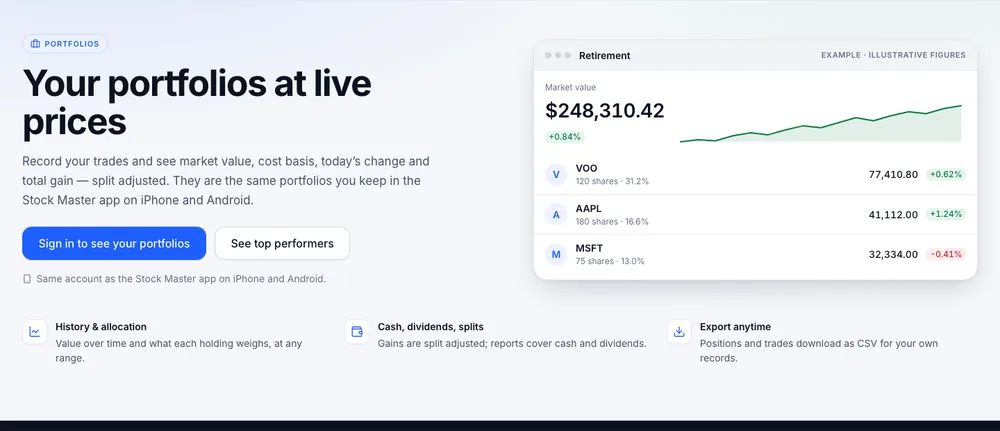
Signed out, Portfolios shows an example portfolio with illustrative figures, what the page offers — history and allocation, cash, dividends and splits, CSV export — and Sign in to see your portfolios (Sign in to Finabase on the web and manage your account).
Your portfolios
Signed in, the page starts with a combined summary of every portfolio: Market value, Day gain, Unrealized gain, Cost, Realized gain and Total gain. Portfolios you marked "exclude from summary" are left out. Below are a history chart with ranges from 1D to Max (one year by default) and an Inspect history slider to read any past date, an allocation table, and the list of portfolios, searchable and sortable by name, currency, positions, market value, cost or gains.
New portfolio asks for a Name — "Retirement", "Dividend income" — and opens it so you can add the first position.
Adding trades
Open a portfolio and click Add a trade:
- Symbol — the ticker.
- Type — Buy, Sell, Buy to cover or Sell short.
- Shares and Price per share.
- Commission — pre-filled from the portfolio's default.
- Trade date, Exchange and an optional Trade note.
Save trade adds it, and the position updates at once. Add a symbol tracks a ticker before you trade it. Each position's View trades lists its transactions with the running share count, running cost and average price; Edit trade and Delete trade fix mistakes ("Remove this trade here and in Stock Master?").
Positions are split-adjusted: after a 4-for-1 split, 10 shares bought at $400 show as 40 shares at $100, so gains stay correct. See Stock splits explained: forward splits, reverse splits, examples.
Reports, cash and dividends
Reports, cash & dividends on a portfolio opens:
- Performance by period and a position report with a Period (all time, 1 day, 1 week, 1 month, 3 or 6 months, year to date, 1 or 2 years), sorting, an Open positions only switch and selectable columns. Export report CSV downloads it.
- Cash transactions — Deposit or Withdrawal, amount, currency, date and note.
- Dividends — automatic, from each holding's payout history, or manual, if you want to enter what your broker actually paid.
- Portfolio preferences — currency, default commission, and Exclude from summary.
The transactions page has its own search, sort and Export CSV.
Plan limits
Watchlists and portfolios share one count: 4 on Free, 30 on Essentials, 100 on Plus and unlimited on Premium. Stocks per portfolio: 50, 300, 500 and unlimited. At the stock limit you can still trade symbols you already hold. See Finabase plans on the web: Free, Essentials, Plus and Premium.
Frequently asked questions
Can Finabase import trades from my broker?
Not on the web today. Enter trades with Add a trade; the Stock Master app shares the same portfolios.
Are portfolio values realtime?
They use the same live quotes as the rest of the site; realtime coverage of every exchange comes with Plus and Premium.
How do I record a short sale?
Use Sell short to open it and Buy to cover to close it.
Is there a demo money mode?
Yes — paper trading gives you $10,000 of virtual cash to practise with (Practise with Finabase paper trading on the web).
Summary
Create a portfolio, record each trade with Add a trade, and read your value and gains at live, split-adjusted prices. Add cash and dividends for a complete picture, run period reports, and export everything as CSV. On iPhone, see Track a portfolio in Stock Master: transactions, gains and reports.