
Mobile app · Tools
Track a portfolio in Stock Master: transactions, gains and reports
Create a portfolio in Stock Master, record buys, sells, shorts, cash and dividends, read day gain, total gain and realized profit, and export reports.
On this page
A watchlist follows prices; a portfolio follows your money. Enter what you bought and sold, at what price and when, and Stock Master works out today's gain, your total gain, the cost of each position, realized profits from what you sold, dividends received and your cash — and keeps the numbers current as prices move. It doesn't connect to a broker: you record the trades, which also means it works for accounts at any broker, or for a plan you are only testing on paper.
This guide covers creating a portfolio, recording transactions, reading the summary, and the reports and exports.
The portfolio screen
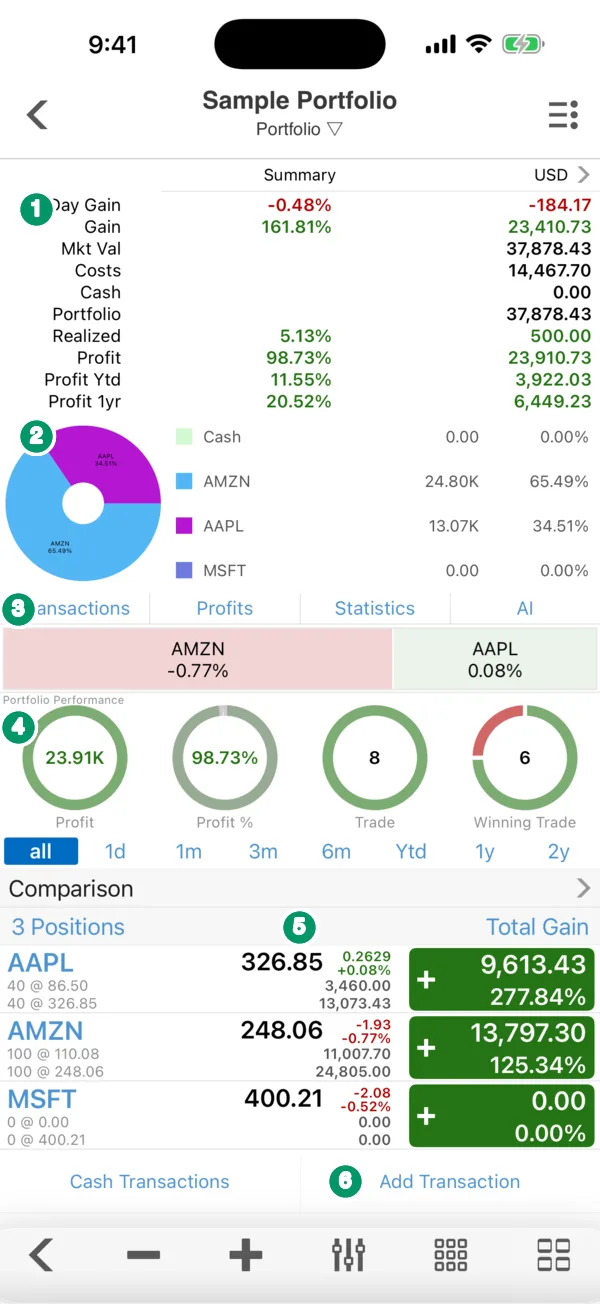
- Summary. The portfolio's key numbers in its currency (USD here):
- Day Gain — the change in value today.
- Gain — unrealized gain on what you hold now, in money and percent.
- Mkt Val — the holdings at today's prices. Costs — what you paid for them.
- Cash — the cash balance your deposits, withdrawals and trades leave.
- Portfolio — market value plus cash.
- Realized — gains already locked in by selling.
- Profit, Profit Ytd, Profit 1yr — realized plus unrealized, all time, this year and over the last twelve months.
- Allocation. A pie of each holding's share of the portfolio, with cash.
- Tabs. Transactions, Profits, Statistics and AI (an AI portfolio analysis, sign-in required).
- Portfolio Performance. Rings for profit, profit %, number of trades and winning trades, over all, 1d, 1m, 3m, 6m, Ytd, 1y or 2y. Comparison sets the portfolio's return beside the market's.
- Positions. One row per holding: shares and average cost, the current price and today's change, and the position's total gain in the colored box. Tap a row for its transactions.
- Cash Transactions and Add Transaction buttons.
Create a portfolio
Open the side menu and tap Portfolios, then ≡ › Add Portfolio. Fill in:
- Name — "Brokerage", "Roth IRA", "Kids' account".
- Currency — the reporting currency. Holdings in other currencies are converted.
- Default Commission — pre-filled on each new trade, so you don't type it every time.
- Include in Summary — whether this portfolio counts in the combined summary of all portfolios.
- Notes.
The app ships with a Sample Portfolio so the screens aren't empty. Delete it whenever you like.
Record transactions
Tap Add Transaction and enter the Symbol, Transaction Type, Quantity, Trade Price, Commission, Date, Time and Notes. The stock transaction types are:
| Type | Use it for |
|---|---|
| Buy | Opening or adding to a long position. |
| Sell | Closing or trimming a long position. |
| Sell Short | Opening a short position (selling borrowed shares). |
| Buy to Cover | Closing a short position. |
Cash Transactions records money that isn't a trade: Deposit, Withdraw, Dividend, Interest Earned, Interest Paid, Other Earned and Other Paid.
Two things are handled for you. Splits are applied automatically (Settings › Portfolio Calculate Stock Split), so a 4-for-1 split doesn't show up as a 75% loss. And cost basis is first in, first out: when you sell part of a position, the oldest shares are sold first, which decides the realized gain. If your broker uses a different method, such as specific lots, the realized figures can differ from your tax forms. See Capital gains tax on stocks: 2026 rates, holding periods and basis.
Reports and exports
The portfolio's ≡ Actions menu includes:
- Realized Positions — every closed position and its gain.
- Dividend Income — dividends by symbol and date.
- Portfolio Map — the holdings as a heatmap.
- Upcoming Events — earnings and ex-dividend dates for what you own.
- Export Portfolio — CSV file, PDF file, Excel file, Copy to Clipboard, or Save to Main Watchlist.
- PDF Report, Duplicate Portfolio, Sort and Key Field, which picks the number shown in each position's box: day gain, total gain, Ytd or one-year gain, or profit.
Portfolio Reports in the side menu combines all portfolios, grouped by stock or by currency.
Virtual trading
Virtual Trading (side menu › Portfolios) is a practice account with virtual money. You place orders — Limit, Stop, Trailing Stop or Trailing Stop % — against live prices and watch your Buying Power. It requires sign-in. It is a safe place to try the order types explained in Stock order types explained: market, limit, stop and more.
Limits
Free accounts can keep three portfolios with up to 50 different symbols across them. A plan removes both limits.
Frequently asked questions
Does Stock Master connect to my brokerage account?
No. You record transactions yourself, so it works with any broker and nothing can be traded from the app. Exports let you move the data elsewhere.
How are dividends counted?
Record them as Dividend cash transactions, or let the app calculate them from your holdings (Settings › Show Portfolio Calculated Dividend). They appear under Dividend Income and in profit.
Why does my gain differ from my broker's?
Common reasons: a different cost-basis method (the app uses first in, first out), commissions not entered, missing cash transactions, or extended-hours prices — Settings › Portfolio Update with Extended Trading decides whether those are used.
Can I track a portfolio in another currency?
Yes. Set the portfolio's Currency when you create it; holdings in other currencies are converted at current exchange rates.
Summary
Create a portfolio, record trades and cash, and Stock Master keeps day gain, total and realized gain, cash and profit up to date, with first-in-first-out cost basis and automatic split adjustments. Use the ≡ Actions menu for realized positions, dividend income and exports, and Virtual Trading to practice without real money.