
Mobile app · Quotes
The Stock Master quote screen, field by field
Read every part of a Stock Master quote: price and change, bid and ask, key statistics, ranges, the technical gauges, the section tabs and the toolbar.
On this page
Tap any symbol in Stock Master — in a watchlist, a search result, a Home tile — and its quote screen opens. It is the densest screen in the app: the live price, more than twenty statistics, a technical-analysis summary, a chart, and tabs that lead to the company's news, financials, analyst ratings, insider trades and options.
This guide walks through it from top to bottom, using the Nvidia (NVDA) quote as the example, and explains what each number means. For a general primer on reading any quote, see How to read a stock quote: every field explained.
The top of the screen
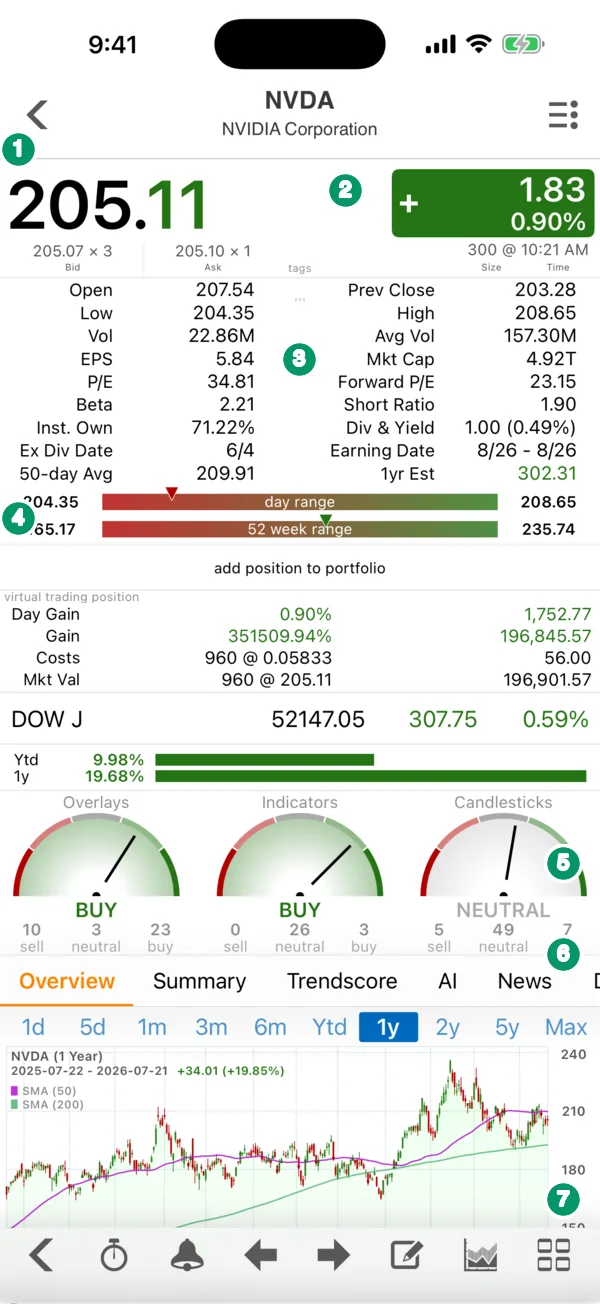
- Last price. The most recent trade, here 205.11. The digits that changed on the last update are drawn in color, so you can see which part of the price just moved.
- Change box. The move since the previous close in dollars (+1.83) and percent (+0.90%), green when up and red when down. Under the price are the bid (205.07 × 3) and ask (205.10 × 1), each with its size, and on the right the size and time of the last trade (300 shares at 10:21 AM). The gap between bid and ask is the spread.
- Key statistics. Two columns of facts, explained in the table below.
- Ranges. Two bars place today's price inside the day range (low to high today) and the 52-week range. A marker shows where the price sits; near the right end means close to the high.
Outside the regular session an extra line shows the pre-market or after-hours price and its change — see Real-time and extended-hours prices in Stock Master.
The statistics grid
| Field | What it means |
|---|---|
| Open / Prev Close | Today's first regular-session price and yesterday's closing price, the base for the change box. |
| High / Low | Today's highest and lowest trades. |
| Vol / Avg Vol | Shares traded today and the recent daily average. Volume far above average signals unusual interest. |
| EPS | Earnings per share over the last twelve months. |
| Mkt Cap | Market capitalization: price × shares outstanding (4.92T = $4.92 trillion). |
| P/E / Forward P/E | Price divided by trailing EPS, and by analysts' estimate of next year's EPS. |
| Beta | How much the stock has moved relative to the market; above 1 means more volatile. |
| Short Ratio | Shares sold short divided by average daily volume — roughly, days to cover. |
| Inst. Own | Share of the company held by institutions such as funds and pension plans. |
| Div & Yield | Annual dividend per share and its yield at today's price. |
| Ex Div Date | Buy before this date to receive the next dividend. |
| Earning Date | The next expected earnings report. |
| 50-day Avg | The 50-day simple moving average of the price. |
| 1yr Est | The analysts' average one-year price target. |
Below the grid, add position to portfolio records a holding in one tap. If the symbol is already in a portfolio or your virtual-trading account, your position appears here: today's gain, total gain, cost and market value.
Comparison, performance and the gauges
Next comes a Quick Comparison line — the Dow in the picture — so you can see whether the stock is beating the market today, and bars for its year-to-date and one-year returns.
The three gauges are the Technical Analysis summary. Each runs a set of studies on the stock's price history and counts how many currently read buy, neutral or sell:
- Overlays — moving averages, Bollinger Bands, Parabolic SAR and the like.
- Indicators — oscillators such as RSI, MACD and the stochastic.
- Candlesticks — recognized candlestick patterns.
In the picture, 36 overlay readings split 10 sell, 3 neutral and 23 buy, so the needle reads BUY; all 61 candlestick patterns are checked, and with 49 neutral that gauge reads NEUTRAL. Treat the gauges as a summary of the chart, not a forecast. They change as prices change, and studies that agree are often measuring the same thing. The guides on RSI and MACD explain what the individual readings mean.
The section tabs
Swipe the tab row to move between sections:
| Tab | What it holds |
|---|---|
| Overview | The chart (tap it for the full-screen chart), stock comparison, recent crossovers and candlestick patterns, peers and your notes. |
| Summary | Earnings announcements, analyst recommendations, upgrades and downgrades, dividends, splits, the business summary, institution and fund ownership, and SEC filings. |
| Trendscore | Finabase's trend rating for the stock. |
| AI | An AI-written analysis of the stock, with follow-up questions (sign-in required). |
| News | Related news. |
| Discussion | Posts from other users about the symbol. |
| Alert | Your alerts on this symbol. |
| Financials | Income statement, balance sheet and cash flow, quarterly or annual. |
| Insider | Insider holders and recent insider transactions. |
| Options | Options you are watching on this stock. |
Choose Customize Sections from the ≡ Actions menu to hide sections you never use, reorder them or move them between tabs.
The toolbar and the Actions menu
The bottom toolbar, left to right: back, Option Chains, Add Alert (the bell), previous and next symbol in the list you came from, Notes, the Quick Comparison toggle, and the shortcut panel. The arrows let you flip through a whole watchlist without going back.
The ≡ Actions menu adds research shortcuts — Key Statistics, Analyst Forecast, Valuation & Health, Fund Holdings, Dividends, Earnings Preview — plus Add to Watchlist, Backtesting Strategies, Customize Chart, View PDF Chart, Refresh Data and Share. Items appear only when they apply: an index has no option chain, and a stock without a dividend has no Dividends item.
Frequently asked questions
Why is the price on the quote screen different from my broker's?
Prices can differ by a few cents because quotes come from different feeds and update at slightly different moments. Free users also see prices that can lag the exchange; see Real-time and extended-hours prices in Stock Master.
What does "1yr Est" mean?
It is the average of analysts' one-year price targets for the stock. It is an opinion, not a prediction the app makes, and targets are often revised after big moves.
How do I see a bigger chart?
Tap the chart in the Overview tab to open the full-screen interactive chart, or turn the phone sideways. See Interactive charts in Stock Master: ranges, types and zoom.
Can I hide the tabs I don't use?
Yes. Open the ≡ Actions menu, tap Customize Sections, and hide or reorder them.
Summary
The quote screen stacks the live price and change, a statistics grid, range bars, a technical summary and research tabs on one page. Read the top for price and liquidity, the grid for valuation and dividends, the gauges for what the chart says, and the tabs for news, financials and ownership — and use the arrows to step through your watchlist.