
Mobile app · Discover
Earnings calendar and upcoming events in Stock Master
See who reports earnings each day in Stock Master, and track upcoming earnings and ex-dividend dates for your own watchlists and portfolios.
On this page
Earnings reports move stocks more than almost anything else: a 5–10% gap on the morning after a report is routine. Dividends have their own key date, the ex-dividend date, which decides who gets paid. Stock Master tracks both twice over: an Earnings Calendar for the whole market, day by day, and Upcoming Events for just the stocks in your watchlists and portfolios.
This guide shows how to read both screens and where else the dates appear in the app.
The two screens
Earnings Calendar
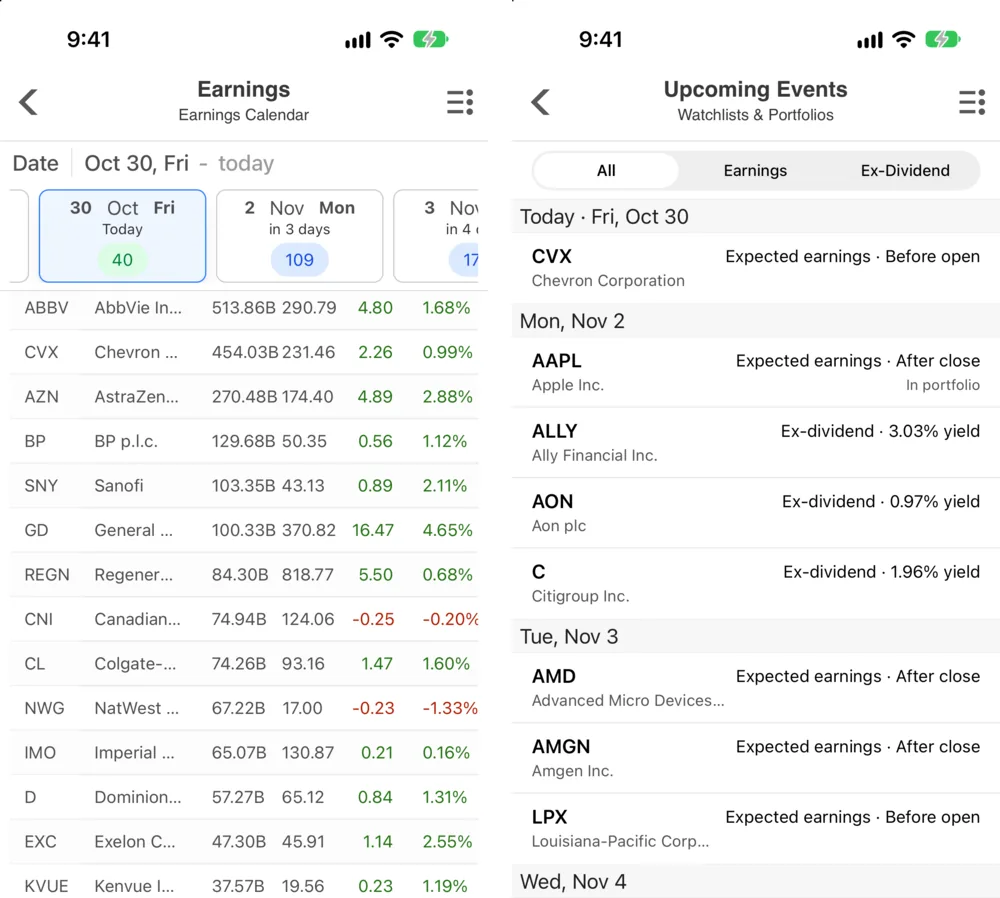
Open Earnings Calendar from the side menu or the Home screen's favorite actions. Along the top is a date strip: each day shows how many companies report, such as 40 today and 109 on Monday. Swipe it to move through the weeks; tap a day to load it.
Below, the day's reporting companies are listed with Symbol, Name, Market Cap, Last Trade, Change and Change %, largest first, so the reports that move indexes are at the top. The buttons above the table switch between layouts, and filter narrows the list. Tap a row to open the quote.
During earnings season — roughly the three to five weeks after each quarter ends — the daily count climbs into the hundreds. Trading earnings season: implied moves, IV crush and earnings gaps explains what moves stocks on earnings day.
Upcoming Events
Upcoming Events (side menu › Stock Screen) is the personal version: only the symbols in your Watchlists & Portfolios, grouped by date, starting today.
- Expected earnings · Before open or · After close — the report time. "After close" news moves the after-hours price and the next morning's open.
- Ex-dividend · 3.03% yield — buy before this date to receive the next dividend; the stock usually opens lower by about the dividend on the ex-date (Dividends and DRIPs: key dates, yield and reinvestment).
- In portfolio — the event is for a stock you own.
Switch tabs to see All events, only Earnings or only Ex-Dividend. You can also add an event to the iPhone calendar with Add to Calendar.
The same list is a click away from a watchlist or portfolio: choose Upcoming Events in its ≡ Actions menu to see only that list's dates.
Earnings on the quote screen
- Earning Date in the statistics grid shows the next expected report.
- The Summary tab's Earnings Announcements section shows past reports, and Analyst Recommendation and Upgrades & Downgrades show how analysts reacted.
- Earnings Preview in the ≡ Actions menu gives an AI-written preview of what to watch before the report (sign-in required).
- With Settings › Show Events on Fullscreen Chart on, the full-screen chart marks events with small lettered markers, so you can see how the stock moved around past reports.
Planning around earnings
Some practical uses:
- Check before you buy. If a company reports tomorrow after the close, a new position takes on the earnings gap risk. Decide whether you want that.
- Check before you sell options or set tight stops. A report can jump straight through a stop-loss level.
- Watch the after-hours sort. On a busy evening, sort your watchlist By After Hour Change % (Watchlist view modes, sorting and filters in Stock Master).
- Mind the ex-date. Buying a stock the day before its ex-date to "catch" the dividend usually doesn't pay: the price drops by about the dividend.
Frequently asked questions
Where is the earnings calendar in Stock Master?
In the side menu under Stock Screen › Earnings Calendar, and as Earnings Calendar in the Home screen's favorite actions.
Can I see earnings dates only for my stocks?
Yes. Upcoming Events lists earnings and ex-dividend dates for your watchlists and portfolios only, or choose Upcoming Events from one list's Actions menu.
What does "Before open" mean?
The company reports before the 9:30 a.m. ET open, so the reaction shows in the pre-market and at the open. "After close" means after 4:00 p.m. ET, with the reaction after hours.
Are earnings dates confirmed?
Dates marked expected are estimates until the company confirms them, and companies occasionally move a report. Check the company's investor-relations page if the date matters.
Summary
The Earnings Calendar shows the whole market's reports day by day, largest companies first; Upcoming Events narrows that to the earnings and ex-dividend dates of the stocks you follow, with report times and yields. Check both before you trade around a report.