
Mobile app · Tools
Find stocks with the Stock Master stock screener
Build a stock screen in Stock Master from price, valuation, dividend, return and technical criteria, or describe it in words, then sort, limit and save it.
On this page
A screener turns "show me stocks like this" into a list. You set the rules — market cap above $10 billion, a dividend yield over 3%, a P/E under 20, price just crossed above its 50-day average — and the screener checks every stock on the exchange and returns the ones that pass. Stock Master's Stock Screener runs on Finabase's servers against more than a hundred fields, and you can type what you want in plain English and let the app build the criteria.
This guide covers the starter screens, building and editing a screen, the criteria available, and how to use screens without fooling yourself.
Saved screens and the editor
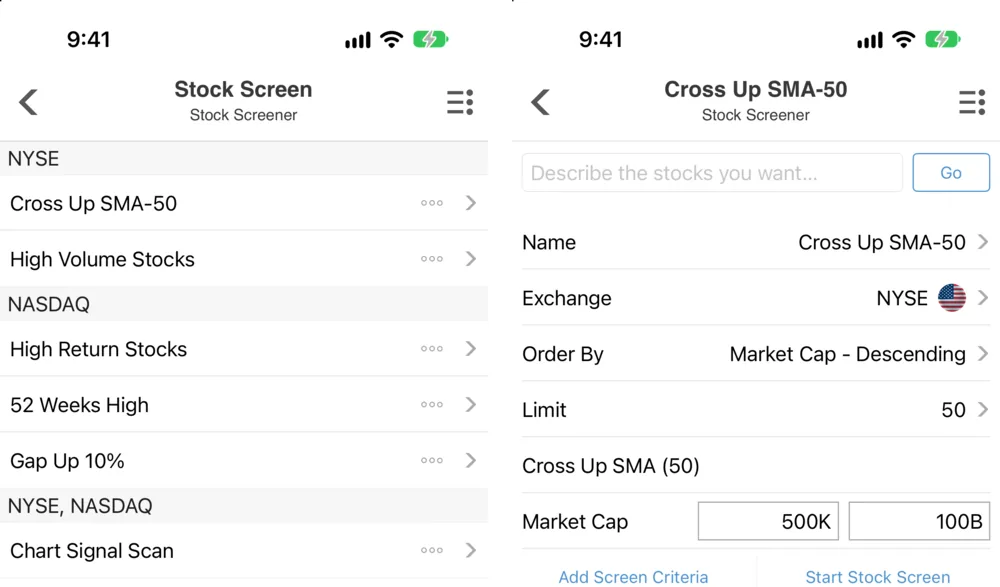
Open the side menu and tap Stock Screener. The app ships with starter screens you can run or copy:
- NYSE — Cross Up SMA-50, High Volume Stocks.
- NASDAQ — High Return Stocks, 52 Weeks High, Gap Up 10%.
- NYSE, NASDAQ — Chart Signal Scan.
Tap a screen's name to run it. The results are a normal quote list — prices, change boxes, extended-hours prices — that you can sort, switch to a heat map, or open symbol by symbol. Tap the ◦◦◦ beside a screen to edit it.
The editor
- Describe the stocks you want… and Go — type a request such as "large-cap tech stocks with dividends" and the app fills in criteria for you.
- Name — what the screen is called in the list.
- Exchange — which market to search, such as NYSE or NASDAQ.
- Order By — how results are ranked, for example Market Cap - Descending.
- Limit — how many results to return, such as 50. The server caps very large limits.
- Criteria — one row per rule. Range fields have a minimum and maximum box (Market Cap 500K to 100B above); signal fields such as Cross Up SMA (50) have none.
- Add Screen Criteria and Start Stock Screen.
Add a new screen with + in the list (or ≡ › Add Stock Screen); remove screens with −.
Criteria you can use
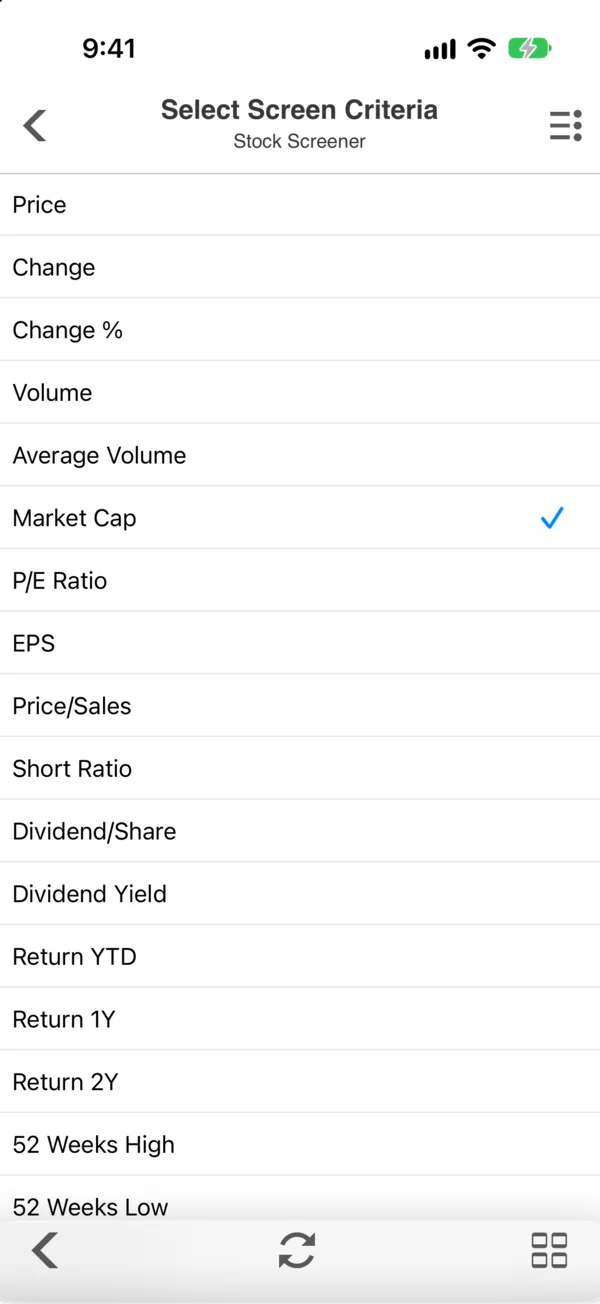
The criteria list comes from the server, so new fields appear without an app update. It starts with the everyday ones:
| Group | Fields |
|---|---|
| Price & volume | Price, Change, Change %, Volume, Average Volume |
| Size & value | Market Cap, P/E Ratio, EPS, Price/Sales, Short Ratio |
| Income | Dividend/Share, Dividend Yield |
| Returns | Return YTD, Return 1Y, Return 2Y |
| Range | 52 Weeks High, 52 Weeks Low |
| Technical | Indicator signals and candlestick patterns, such as Cross Up SMA (50) |
For what the fundamentals mean, see Market capitalization: formula, free float and enterprise value and Dividends and DRIPs: key dates, yield and reinvestment; for the technical signals, the Simple moving average (SMA): formula, crossovers and limits guide and its neighbours.
Example screens
Three educational outlines, not recommendations:
- Large, cheap dividend payers. Market Cap ≥ 10B, P/E Ratio ≤ 18, Dividend Yield ≥ 3, ordered by Dividend Yield descending.
- Momentum leaders. Return 1Y ≥ 30, price within a few percent of the 52-week high, Average Volume ≥ 1M, ordered by Return 1Y.
- Fresh breakouts. Cross Up SMA (50) with Average Volume ≥ 500K, ordered by Change %.
Using screens well
- A screen is a starting list, not a decision. Every name still needs a look at its chart, its news and its financials (How to research a stock: a step-by-step guide for beginners).
- Beware value traps. A very low P/E is often low for a reason — falling earnings ahead.
- Mind the data date. Fundamentals update after reports; a P/E can be stale for a quarter.
- Keep it simple. Two or three meaningful rules beat ten that only describe last year's winners.
Screens have no plan limit: free users can save as many as they like.
Frequently asked questions
How many stocks can a screen return?
You set the Limit in each screen, such as 50. The server caps very large limits, so add criteria to narrow a broad screen rather than raising the limit.
Can I screen with plain English?
Yes. Type into Describe the stocks you want… and tap Go. The app builds criteria from your words; review and adjust them before running.
What is the difference between the screener and the scanner?
The screener filters by fields you choose — price, valuation, returns, signals. The scanner runs ready-made scans for noteworthy moves, indicator signals and candlestick patterns. See Scan the market for signals with the Stock Master scanner.
Do screens cost extra?
No. The screener has no plan gate and no limit on saved screens.
Summary
Open Stock Screener, start from a starter screen or a sentence in the describe box, set the exchange, criteria, order and limit, and run it. Treat the results as a research list: check each name, mind stale fundamentals, and keep the rules few.