
Mobile app · Tools
Scan the market for signals with the Stock Master scanner
Use Stock Master’s Market Stock Scan and User Stock Scan to find gainers, 52-week highs, gaps, indicator signals and candlestick patterns across an exchange or your list.
On this page
A screener answers questions you write. A scanner answers the questions most traders ask every morning anyway: what is up most, what just hit a 52-week high, what gapped, where did MACD just turn bullish, which stocks printed a hammer yesterday? Stock Master's scanner runs those checks across a whole exchange — Market Stock Scan — or across your own watchlist — User Stock Scan — and lists the hits under clear headings.
This guide explains both scans, the result groups, the options, and how to treat a signal list.
Market Stock Scan
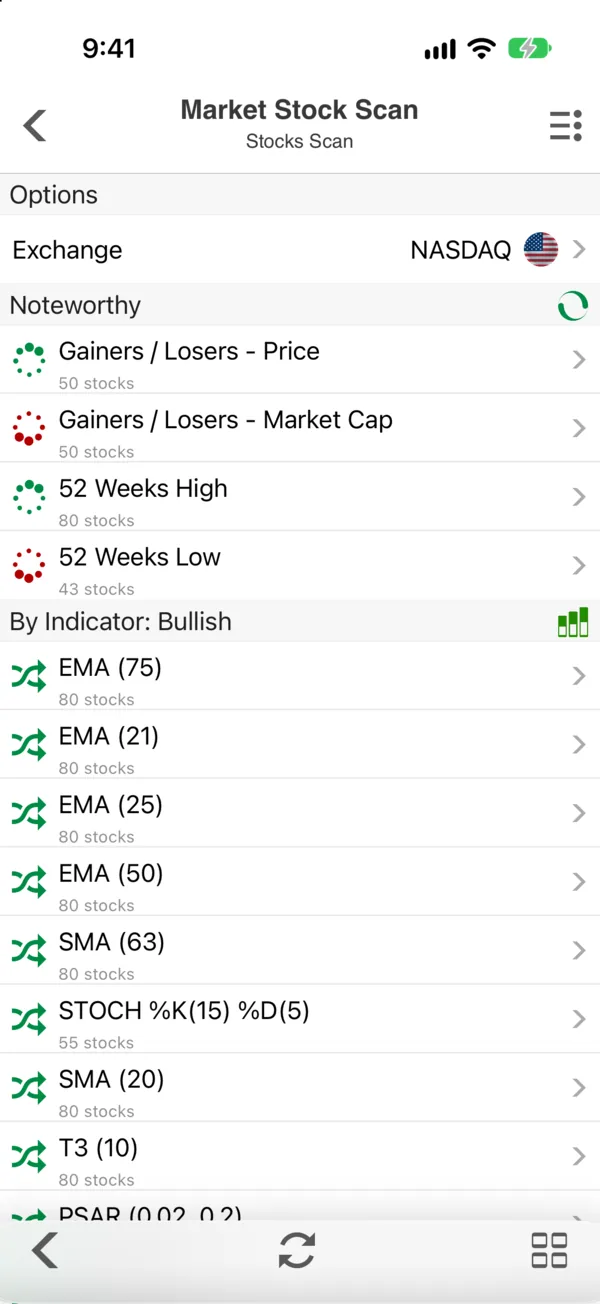
Open the side menu and tap Market Stock Scan (Stock Screen section). At the top, Options holds the Exchange; tap it to switch markets. The results follow:
- Noteworthy — Gainers / Losers - Price, Gainers / Losers - Market Cap, 52 Weeks High and 52 Weeks Low.
- By Indicator: Bullish and Bearish — one row per study and setting that just signaled: EMA (21), SMA (63), STOCH %K(15) %D(5), T3 (10), PSAR (0.02, 0.2) and so on. For a moving average, a bullish signal is the price crossing above it.
- By Candlestick Pattern — stocks where a pattern such as an engulfing or hammer just formed.
- Gap Up/Down — stocks that opened well away from the previous close (Gap trading: price gap types, gap fills and what the data shows).
Each row says how many stocks matched (80 stocks, 55 stocks). Tap a row for the list of symbols, which opens like any watchlist — sort it, chart it, or open a quote.
User Stock Scan
User Stock Scan runs the same checks on symbols you choose instead of a whole exchange. Set the Source to a watchlist and pick the chart setting whose studies to use, so the scan looks for exactly the indicators you trade. A user scan covers up to 300 symbols.
It is the quickest way to answer "which of my stocks has a signal today?" without opening eighty charts.
Scan options
- Scan Type — End of Day (signals on completed daily bars) or Intraday (signals on today's developing bars, which can disappear before the close).
- Scan Period Limit / Occurred in Last — how many recent bars count. "Occurred in last 1" means the signal fired on the latest bar; a larger number catches signals from the last few sessions.
Reading a signal list
The scanner finds events, not opportunities. Some habits help:
- Prefer End of Day signals for anything slower than day trading. Intraday signals change until the bell.
- Check the trend. A bullish oscillator signal in a stock below its falling 200-day average is a bounce in a downtrend more often than a reversal.
- Count matters. When 80 NASDAQ stocks cross above their 21-day EMA on the same day, the signal says more about the market than about any one stock.
- Know the pattern's record. Each candlestick guide in this library reports how the pattern has actually performed, for example Hammer candlestick pattern: meaning, rules and reliability.
To be notified when a signal fires on a stock you follow, set an indicator alert instead (Set price, percent and indicator alerts in Stock Master).
Frequently asked questions
What is the difference between Market Stock Scan and User Stock Scan?
Market Stock Scan checks a whole exchange with the standard studies. User Stock Scan checks a watchlist you choose, with the studies from a chart setting you pick.
Does the scanner find candlestick patterns?
Yes. The By Candlestick Pattern group lists stocks where a recognized pattern just formed.
How recent are the signals?
That depends on Occurred in Last. With a value of 1 and the End of Day scan type, a signal fired on the last completed daily bar.
How many stocks can a User Stock Scan check?
Up to 300 symbols per scan.
Summary
Market Stock Scan lists an exchange's noteworthy movers, indicator signals, candlestick patterns and gaps; User Stock Scan does the same for your own list with your own chart setting. Use End of Day signals, check the trend, and treat each hit as a reason to look, not a reason to act.