
Mobile app · Tools
Backtest a trading strategy in Stock Master
Test a signal-based trading strategy on a stock or a whole watchlist in Stock Master, read trades, win rate and P&L, and avoid the classic backtesting traps.
On this page
A backtest asks a simple question: if I had followed this rule in the past, what would have happened? Stock Master lets you build a rule from the same chart studies you use every day — MACD crosses, RSI levels, Parabolic SAR flips — run it on any stock over a chosen period, and see every trade it would have made, with wins, losses and total profit. You can run the same strategy across a whole watchlist to see whether it works broadly or only on one lucky chart.
This guide explains the backtesting screen, the results, and the traps that make most backtests look better than real trading.
The backtesting screen
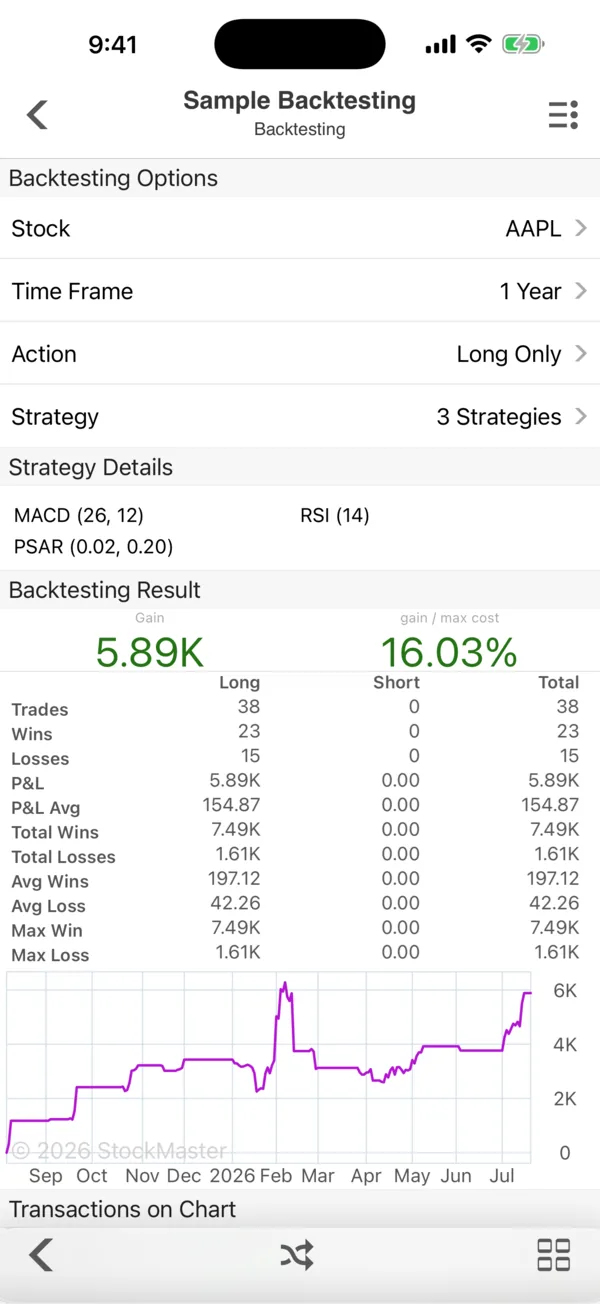
Open the side menu and tap Backtestings under Stock Screen. Each saved test opens on a screen with three parts.
Backtesting Options
- Stock — the symbol to test.
- Time Frame — how much history to use, such as 1 Year.
- Action — Long Only (buy on a buy signal, sell on a sell signal), Short Only (the reverse), or Long & Short (flip between the two).
- Strategy — the studies that generate the signals.
- Close Position — the rule for closing an open position.
Strategy Details
The studies in the strategy, with their settings — in the example MACD (26, 12), PSAR (0.02, 0.20) and RSI (14). These are the same studies as on the chart, and you edit them the same way: tap to change a period, or add and remove studies (Add indicators and candlestick patterns to Stock Master charts). Each study gives buy and sell signals — for MACD, the line crossing its signal line; for Parabolic SAR, the dots flipping sides; for RSI, the move through its levels. See MACD indicator: signal line, histogram and divergence, Parabolic SAR: how stop-and-reverse works, step by step and Relative Strength Index (RSI): how to read and use it for how each signal works.
Backtesting Result
The headline is the total Gain in money and Gain / Max Cost — profit divided by the most capital the strategy had tied up at once, a fairer return measure than profit alone. In the example the strategy made 5.89K, 16.03% of its maximum cost, over 38 trades: 23 wins and 15 losses.
The table repeats the numbers for Long, Short and Total trades:
| Row | Meaning |
|---|---|
| Trades / Wins / Losses | How many round trips, and how many made or lost money. |
| P&L / P&L Avg | Total profit or loss, and per trade. |
| Total Wins / Total Losses | The sum of the winners and of the losers. |
| Avg Wins / Avg Loss | The typical winner and loser. |
| Max Win / Max Loss | The single best and worst trade. |
Below, the equity chart plots the strategy's cumulative profit over the period, and Transactions on Chart shows every entry and exit on the price chart, so you can see whether the rule bought where you would have.
Test across many stocks
One stock can flatter any rule. Backtesting Stocks runs a strategy over every symbol in a watchlist and lists the results side by side; you can start it from a watchlist's ≡ Actions menu too. If a rule only works on two of thirty stocks, it probably doesn't work.
Backtesting Strategies is a separate, portfolio-level tool: you split money into Allocations — weights that must add up to 100% — and Blocks, and test the combined result. With a plan, Save As Portfolio turns a backtest's trades into a portfolio you can open like any other (Track a portfolio in Stock Master: transactions, gains and reports).
The traps
Backtests are easy to fool yourself with:
- Overfitting. Tweak the periods until the past looks perfect, and you have described the past, not found an edge. Settle on settings first, then test.
- Costs and slippage. Real trades pay spreads and sometimes commissions. A rule that trades every few days can lose its whole edge to costs.
- One market regime. A trend-following rule shines in a trending year and bleeds in a sideways one. Test several time frames.
- Win rate isn't everything. Compare Avg Wins with Avg Loss: a 40% win rate is fine if winners are three times the size of losers.
Free users can keep three backtests and three strategies; a plan removes the limit.
Frequently asked questions
Can I backtest my own strategy in Stock Master?
Yes. Build a strategy from any of the chart studies, choose long, short or both, and run it on a stock or a whole watchlist.
Does the backtest include commissions?
The results are the trades the signals would have made at the recorded prices. Treat them as before costs, and allow for spreads and fees when you judge the result.
What does "Gain / Max Cost" mean?
It is the total profit divided by the most money the strategy had invested at any one time — the return on the capital you would actually have needed.
Why are my results so different on another stock?
Signals depend on how each stock trends and swings. That is why testing across a watchlist with Backtesting Stocks is more informative than any single result.
Summary
Pick a stock, a time frame, long or short, and a strategy built from chart studies, and Stock Master replays every trade with wins, losses and P&L. Check the result across a whole watchlist and several periods, compare average wins and losses, and allow for costs before trusting it.