
Mobile app · Alerts
Set price, percent and indicator alerts in Stock Master
Create Stock Master alerts for a price, a daily or total percent move, volume, a trailing stop or an indicator turning bullish or bearish, and manage them.
On this page
An alert watches a stock for you and sends a notification when something you care about happens: the price crosses a level, the stock moves more than a set percentage, volume spikes, or an indicator such as RSI or MACD turns bullish. Stock Master's alerts run on Finabase's servers, not on your phone, so they fire even when the app is closed. They work without an account.
This guide covers every alert type, how to create and edit alerts, the notification options, and how to manage the list.
Create an alert
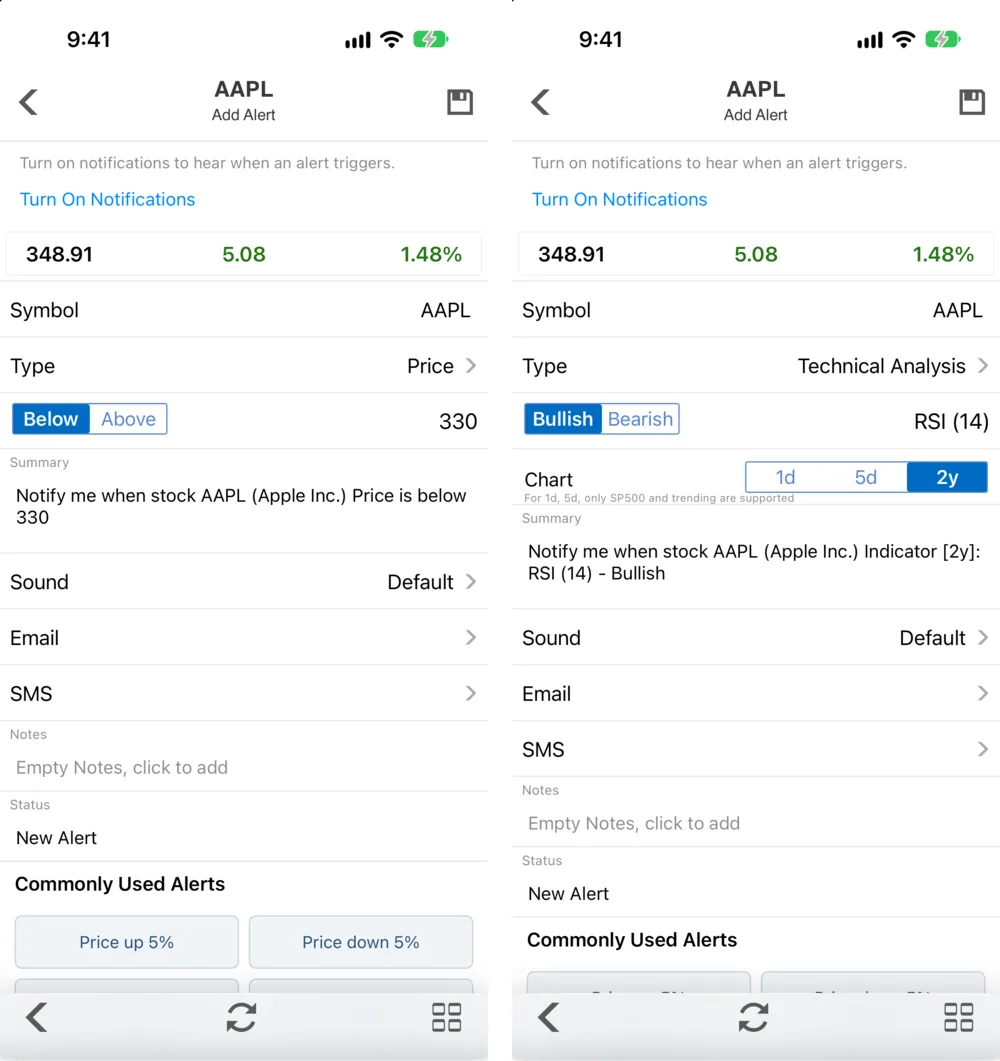
- Open a quote and tap the bell in the bottom toolbar. (Or open Stock Alerts from the side menu's My Stuff section and tap +.)
- The Add Alert screen shows the live price and today's change at the top, then:
- Symbol — the stock.
- Type — tap to choose; Price is the default.
- The comparison — Below or Above for a price — and the Value.
- Summary — the alert in plain words, so you can check it: "Notify me when stock AAPL (Apple Inc.) Price is below 330".
- Sound, Email, SMS, Notes and Status.
- Tap the save icon at the top right.
Below the form, Commonly Used Alerts has one-tap presets such as Price raise 5% and Price drop 5%.
The first time you save an alert, iOS asks for permission to send notifications. If you said no, the alert screens show Turn on notifications to hear when an alert triggers with a Turn On Notifications button (or Open Settings, if notifications were turned off in the iPhone settings).
Alert types
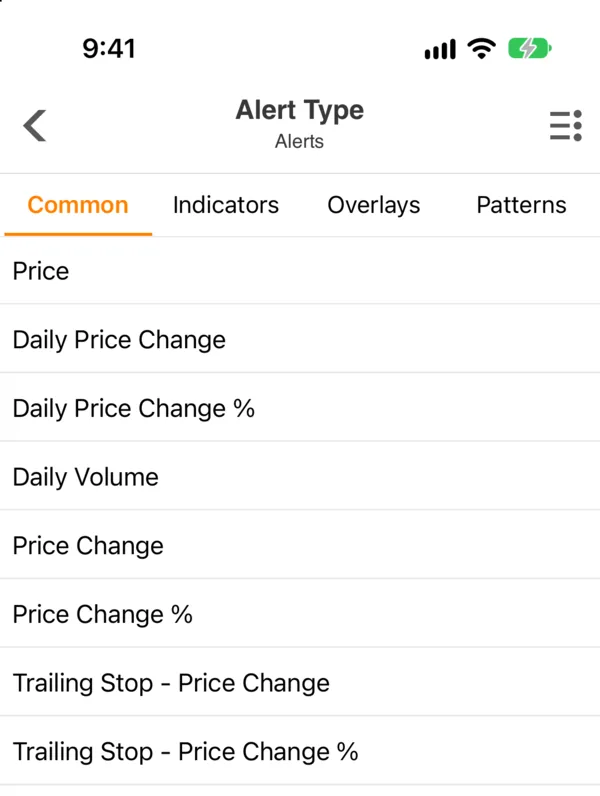
| Type | Fires when… | Compare |
|---|---|---|
| Price | The price crosses your value. | Below / Above |
| Daily Price Change | Today's move from the previous close exceeds a dollar amount. | Drop / Raise |
| Daily Price Change % | Today's move exceeds a percentage. | Drop / Raise |
| Daily Volume | Today's volume exceeds a number of shares. | Above |
| Price Change | The price has moved a dollar amount from when you set the alert. | Drop / Raise |
| Price Change % | The price has moved a percentage from when you set the alert. | Drop / Raise |
| Trailing Stop - Price Change | The price pulls back a dollar amount from its best level since you set the alert. | Drop / Raise |
| Trailing Stop - Price Change % | The price pulls back a percentage from its best level since you set the alert. | Drop / Raise |
The daily types reset every session; the Price Change types measure from the price when you created the alert, which suits "tell me if my entry is 10% underwater". A trailing stop follows the price up and only fires on a pullback from the peak — the same idea as a trailing stop order, except that the alert only notifies you and never trades.
Technical alerts
The Indicators, Overlays and Patterns tabs list the chart studies with their settings — MACD (26, 12), RSI (14), Williams %R (14), the stochastics, CCI, ADX, Aroon, ATR and more. Pick one and the comparison becomes Bullish or Bearish: the alert fires when the study's signal turns that way, for example when RSI turns up from oversold. A Chart switch chooses the time frame the study is computed on — 1d, 5d or 2y. Intraday (1d, 5d) technical alerts are available for S&P 500 and trending stocks only, as the screen notes.
A few overlays — ZigZag, Bollinger Bands, Parabolic SAR, MAMA, Chaikin Money Flow and Pivot Point — aren't offered for alerts. What each signal means is explained in the indicator guides, for example Relative Strength Index (RSI): how to read and use it and MACD indicator: signal line, histogram and divergence.
Notification options
- Sound — Default or one of nineteen tones (Up, Down, Circuit, Melody, Whistle and others), so you can tell alerts apart without looking.
- Email — also send the alert to an email address.
- SMS — also send a text message; this is a plan feature.
- Notes — your reason for the alert ("support from the August low"), so you remember why you set it.
Manage your alerts
Stock Alerts (side menu › My Stuff) lists every alert with its status. The toolbar edits, adds, filters and sorts the list (by symbol, alert type, status, created date or triggered date). The ≡ Actions menu has Edit Alerts, Remove All Alerts, Remove Triggered Alerts and, with a plan, Reset Triggered Alerts, which re-arms them. Each symbol's alerts also appear on its quote's Alert tab.
Notification History (side menu › My Stuff) keeps every notification that fired, with Clear to empty it and Add Alert to set the next one.
Price alerts fire once and then show as triggered; technical alerts re-arm and can fire again the next time the signal turns.
Frequently asked questions
Do Stock Master alerts work when the app is closed?
Yes. Alerts are checked on Finabase's servers and delivered as push notifications, so the app doesn't need to be open. Notifications must be allowed for the app.
Do I need an account to use alerts?
No. Alerts are tied to your device and work signed out. Sign in if you want them to survive a reinstall or a new phone: signed-out alerts are lost when the app is deleted.
How do I set a stop-loss alert?
Use Price with Below for a fixed level, or Trailing Stop - Price Change % to follow the stock up and alert you on a pullback of, say, 8% from its high.
Why didn't my alert fire?
Check that notifications are on for the app, that the alert's status isn't already triggered, and that the condition really happened in the session the alert watches — a Daily Price Change alert only looks at today's move.
Summary
Open Add Alert from a quote's bell, pick a type — price, daily or total change, volume, trailing stop, or a bullish/bearish indicator signal — set the value, and save. Alerts run on the server and arrive as notifications, with optional email and SMS; manage them in Stock Alerts and review what fired in Notification History.