
Web app · Research tools
Rank stocks by trend quality with Finabase Trend Score
Run Finabase Trend Score on an index or watchlist, change the strategy, lookback and benchmark, and read a symbol's overall score, subscores and components.
On this page
Trend Score is Finabase's model for answering one question about a price chart: how strong and how clean is the trend? It measures a stock's slope, how smoothly it climbs, how far and how often it falls back, how it compares with a benchmark, and whether its moving averages line up, then combines those measures into one number between 0 and 1. Run it on an index or on your own watchlist to rank every member, or open it for one symbol to see why it scores the way it does.
This guide covers the ranking page, every analysis setting, the single-symbol view and what the score does and does not tell you.
Ranking an index or watchlist
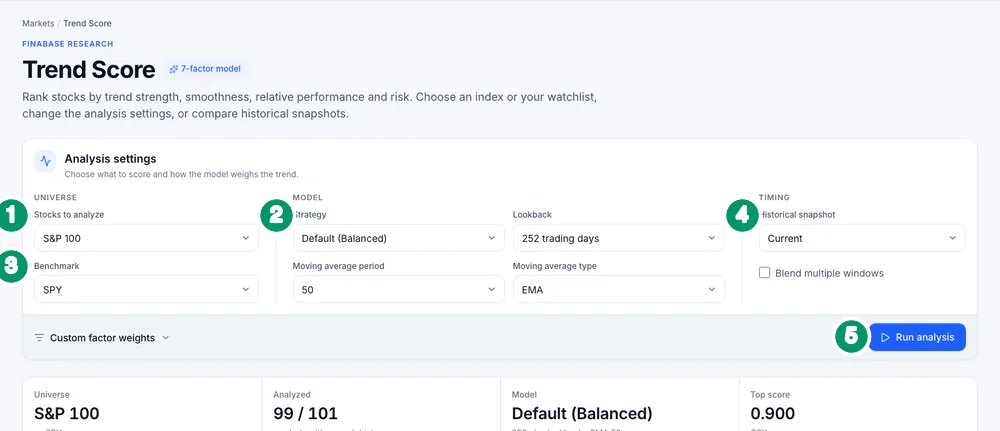
Open Research › Trend Score. The Analysis settings card has:
- Stocks to analyze — Dow Jones 30, S&P 100 (default), S&P 500, S&P MidCap 400, S&P SmallCap 600, Crypto, or, signed in, one of your watchlists (the first 500 symbols).
- Strategy — how the factors are weighted: Default (Balanced), Growth Focus, Quality Focus, Risk-Adjusted, Momentum, Conservative, or Custom weights. Lookback — 63, 126, 189, 252 or 504 trading days (roughly three months to two years).
- Benchmark — SPY, QQQ, IWM or DIA, for the relative-strength factor. Moving average period (10, 20, 50, 100 or 200) and type (EMA or SMA) set the alignment factor.
- Historical snapshot — score as of Current, or 5, 21 or 63 trading days ago, to see how rankings have shifted. Blend multiple windows averages several lookbacks.
- Run analysis.
Custom factor weights opens seven sliders, 0 to 100: Slope (default 30), Smoothness (15), Relative strength (15), MA alignment (15), Low volatility (10), Shallow drawdown (10) and Momentum (5).
A summary strip shows the universe, how many symbols had enough history, the model and the top score. The ranking below has the same Table, Map, Charts, Chart grid and Gauge views as the screener; a few symbols may be listed as needing more history.
One symbol's Trend Score
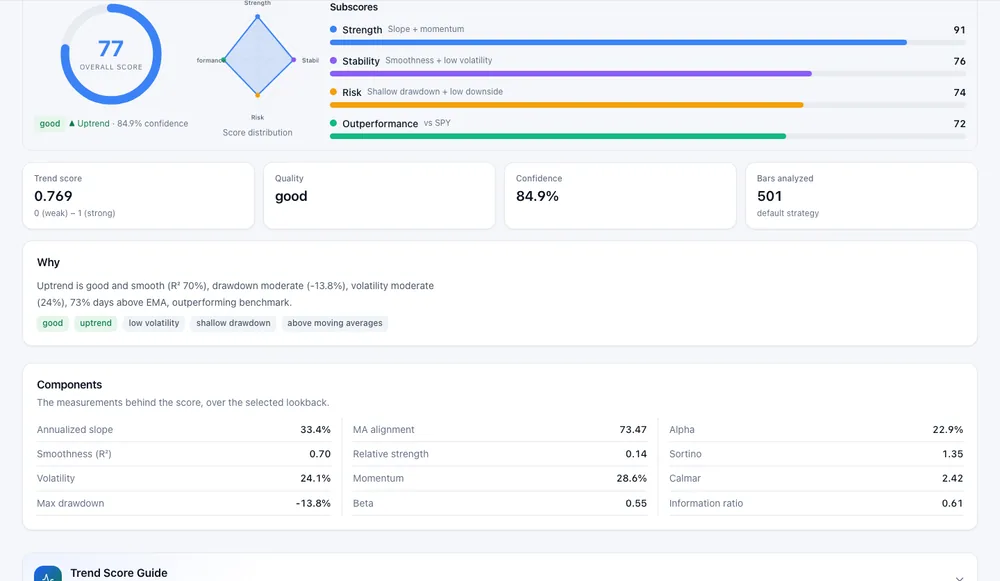
Click a ranked symbol, the Trend Score tab on a symbol page, or open /trendscore/<symbol>.
The page shows:
- Overall score (0–100) with a quality label (for example good), the trend direction (Uptrend) and a confidence percentage.
- Subscores — Strength (slope and momentum), Stability (smoothness and low volatility), Risk (shallow drawdown and low downside) and Outperformance (versus the benchmark), each 0–100.
- Tiles for the Trend score on its 0 (weak) to 1 (strong) scale, Quality, Confidence and Bars analyzed.
- Why — a plain-language reason, for example "Uptrend is good and smooth (R² 70%), drawdown moderate (−13.8%)…".
- Components — the measurements themselves: annualized slope, smoothness (R²), volatility, max drawdown, MA alignment, relative strength, momentum, alpha, Sortino, Calmar, beta and information ratio.
Backtest Timeline replays the score over history so you can see how it moved before past rallies and declines. AI Analyze writes an explanation of the score using your daily AI allowance; it needs sign-in, and strategies other than the default need the Essentials plan or higher.
Using it well
- Compare like with like. Scores depend on the lookback and benchmark. Rank a universe with one setting rather than mixing pages run with different ones.
- Smooth is not safe. A steady climb can still reverse sharply; the drawdown factor only knows the past.
- Use snapshots to spot change. A stock rising from the 60s to the 80s over 21 days tells you more than a stock that has sat at 90 for a year.
- Read the trend concepts behind the factors in Moving averages and trend: filters, the 50/200 and golden crosses and Trends and trendlines: how to identify a trend and draw it correctly.
Frequently asked questions
Is Trend Score free?
Yes. Ranking and single-symbol pages are free and need no account. Ranking your own watchlist and AI Analyze need sign-in.
Why do some symbols need more history?
The model needs a full lookback of daily bars. Recent listings or thinly traded symbols are skipped until they have it.
Does a high score mean the stock will keep rising?
No. It describes how the price has trended over the lookback. Trends end, often without warning.
What does the 0 to 1 trend score mean?
It is the weighted blend of the factors: 0 is no or a very poor trend, 1 a very strong, clean one. The overall 0–100 figure presents the same assessment on a familiar scale.
Summary
Pick a universe and a strategy, run the analysis, and read the ranking; open any symbol for its subscores, components and plain-language reason. Change the lookback, benchmark or snapshot to test how robust a ranking is. On iPhone, see Trend Score and AI analysis in Stock Master.